APOD Report
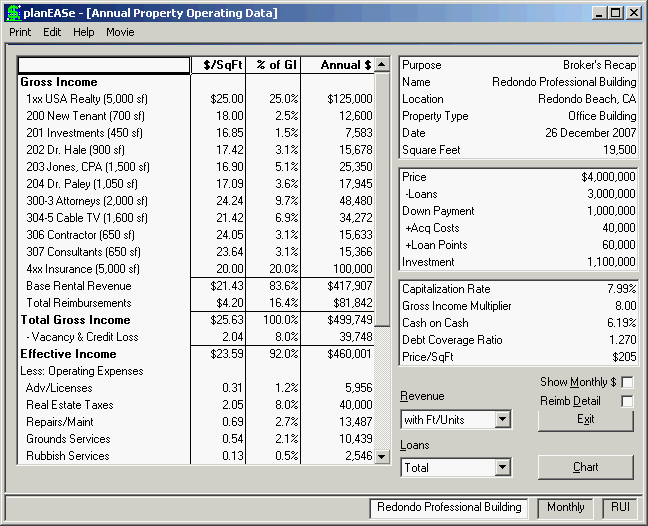
This function allows you to display/print an Annual Property Operating Data (APOD) report for your property. The APOD is a very useful snapshot of the status of a property investment as of the projected Acquisition Date, showing most of the information relevant to the investment, absent any projections of performance. Here we see the APOD for the Redondo Professional Building (on your planEASe System Disk in the Assumption Set named offices.ru). The following controls (located to the bottom right of the screen) allow you to configure your APOD Report in many ways to conform both to your needs and the characteristics of the property.
Revenue may be set to Total, With SqFt, or Without SqFt. Total summarizes all revenue into one Gross Income figure, With SqFt details each revenue and prints the $/SqFt (if Square Footage is positive), Without SqFt details each revenue and does not print $/SqFt for the revenue even if Square Footage is positive. This is useful for properties where the revenue detail for individual leases does not include the lease footage so dividing the amount by the total footage is nonsense for revenues, but meaningful for expenses.
Loans may be set to None, Total or Detail. None omits Debt Service, so the report stops at NOI. In this case the Cash on Cash and Debt Coverage Ratio are not printed. Total shows the total payment for all loans in the Assumption Set. Detail shows the payment for each loan on a separate line. Zero payments (for non-zero loan amounts) will show.
Show Monthly $ can be checked, controlling whether the dollar amounts in the APOD will be expressed as Annual or Monthly amounts.
Reimb Detail will be shown if Reimbursements are included in the Assumption Set and you have chosen to show Reimbursements Separately (see Preferences on Page 7). In this case, the box is not checked, so Reimbursements are shown in total. If this box is checked, the Reimbursements will be shown expense by expense.
APOD Titles The top grid on the right of the APOD screen is the APOD Titles Grid. The text and values shown there may be entered directly into the grid and will be saved with the Assumption Set. Another way to enter these text and values is to click at any time on the Investment Name in the Status Bar at the bottom of the screen, which brings up a dialog box for entering the Investment Name and the other data in the APOD Titles Grid.
APOD Purpose allows you to enter whatever text you want in the “Purpose” line of the APOD titles. Typical purposes are “Broker’s Recap” and “Owner’s Statement”.
Property Location allows you to enter whatever text you want in the “Location” line of the APOD titles.
Property Type allows you to enter whatever text you want in the “Property Type” line of the APOD titles.
Square Feet or Units if 2000 or less, is assumed to be the number of units in the property and the second APOD Column is titled $/Unit. If this value is greater than 2000, it is treated as the Square Feet in the property, and the second APOD column is titled $/SqFt. This value also directs whether the Income Statement function produces a Square Footage Income Statement or a Dlrs/Unit Income Statement. If you enter zero here, the APOD will omit $/SqFt (and the column heading, as well as the Price/SqFt measure). Likewise, the Square Footage or Dlrs/Unit Income Statement will not be available. The default 2,000 value is adjustable by requesting File/Preferences at the Assumption Edit Screen.
The APOD, Annual Statement, and Income Statement report generators examine all expense pages for the characters “Management Fee” (caps don’t matter). If they find one or more, the corresponding expenses (including any following pages whose Page Titles start with an “&”) are added to any Management Fee planned for the property. This allows you to plan management fees either with the Management Fee percentage in the Revenue Pages or as explicit separate expenses, or both.
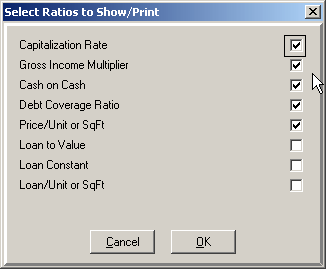
The Print/Ratios... menu choice brings up the dialog shown here, allowing you to set the Ratios to show / print. Your choice of the Ratios is saved and repeatedly used until you change it. In addition the ratios defined elsewhere, Loan to Value is simple the Total Loan(s) Amount as a percent of the Price of Property. Loan Constant is the total loan payment(s) as a percent of the Loan Amount(s), and Loan / Unit or SqFt is the total Loan Amount(s) divided by either the total number of units or SqFt.
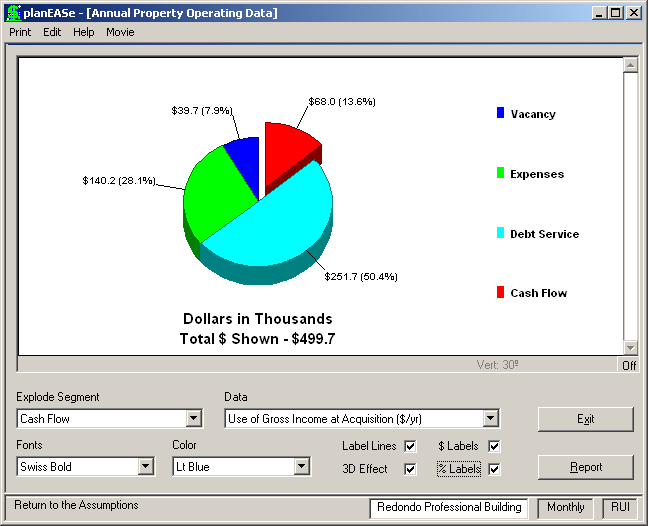
If you have purchased the Graphics Extension , the Chart button shown in the APOD screen on the previous page will be available, offering several Pie Charts of the information contained in the APOD. Here you see the result of pressing that Chart Button --- a Use of Gross Income at Acquisition Pie Chart. Note that the Chart Button has been renamed to Report, providing a path back to the APOD Report. Additional Pie Charts are available for Use of Effective Income at Acquisition, Operating Expenses at Acquisition, and Source of Gross Income at Acquisition.
The APOD is a “snapshot” of the investment at acquisition, so it only considers revenues, expenses and loans in effect at the Acquisition Date. Items beginning after the Acquisition Date (or ending before that date) are not shown. Likewise, measures relating to unshown items (like Cash on Cash or Debt Coverage Ratio when the Loans are not shown) are not shown either. If you want to show the results of the first year (rather than at Acquisition), ask for Reports/Annual Statements for that year rather than the APOD.