Edit Graph
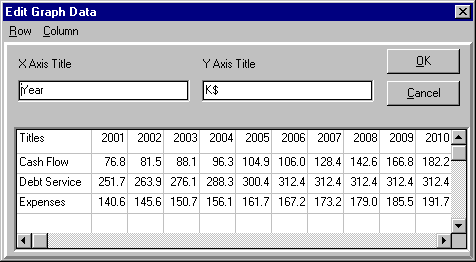
Doubleclicking on any graph or chart displays an Edit Graph (or Chart) Dialog (here showing the values for the Allocation of Effective Income from the previous page), allowing you to edit the graph contents (the dialog is slightly different for charts). All edits are reflected in the graph on screen when you press OK, and the edited graph is what is printed if you request printing. Editing is useful to change X or Y Axis titles and/or text when the planEASe default values are inappropriate.
Row and Column (On the Menu Bar) allow you to Cut, Copy, Paste, Add, Insert, and Delete Rows and Columns in the Graph Data Grid. The first row and column (the Titles) may not be deleted, and you may not insert rows and columns in front of them.