Development Spending Page
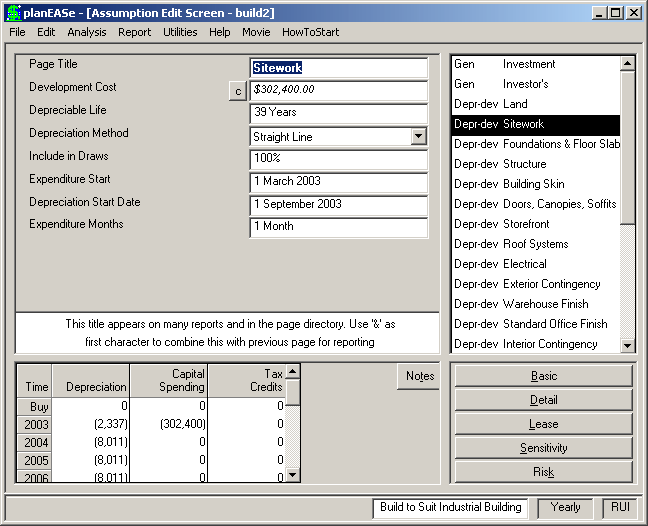
A Development Spending Page is a Page Sub- Type generated by entering a Development Spending Dialog, accessed by choosing Edit / Development Spending... One Development Spending Page is generated for each Develop- ment Item in the Grid in that Dialog. You can edit any of the assumption values shown, and the Development Spending generated in the result- ing analysis will correspond to the edited values. Additionally, appropriate assumption values on the Development Spending Page may also be varied in Sensitivity and Risk analyses. You may discern a Development Spending Page in the Assumption Page List by its Page Abbreviation: Depr-dev. The assumptions in a Development Spending Page are:
DEVELOPMENT COST is the product of the Development Item Cost times the Item Quantity. These values, taken from your corresponding entries in the Development Item Grid of the Development Spending Dialog, are also entered in the Development Cost calculator. If you edit the amount shown here to zero (0.00), the Page Title will become a Title in the Development Spending Dialog, and will disappear from the Assumption Page List the next time you press OK in the Development Spending Dialog. If you edit the amount to any other value in the amount field, the amount will be posted to the Development Spending Dialog as that amount, with a quantity of one (1) and a Measure of Each. If you want to edit the amount without changing anything else, then you must do so in the Calculator.
DEPRECIABLE LIFE This is your entry in the Life column of the Development Item Grid of the Development Spending Dialog (see Depreciable Life).
DEPRECIATION METHOD is not accessible in the Development Spending Dialog, and defaults to Straight Line. If you change the Depreciation Method from the default Straight Line Method first assigned by the Development Spending Dialog, the new method will persist even though you access Edit/Development Spending... and reinsert the specification into the Assumption Set (see Depreciation Method).
INCLUDE IN DRAWS is the percentage of this Development Cost to include in the Construction Draw Loan This is your entry in the Draw column of the Development Item Grid of the Development Spending Dialog.
EXPENDITURE START is your entry in the Start column of the Development Item Grid of the Development Spending Dialog (see Expenditure Date).
DEPRECIATION START DATE is your entry in the In Svc column of the Development Item Grid of the Development Spending Dialog (see Depreciation Start Date).
EXPENDITURE MONTHS is the number of months to spread the Development Cost over. If the number of months is greater than the number of months remaining in the year after the Expenditure Start Date, the
remaining amount will be assigned to the following year. This is your entry in the Mos column of the Development Item Grid of the Development Spending Dialog.
If you edit the Expenditure Start, Expenditure Months and/or Include in Draws entries so as to create the need for a draw after the latest scheduled need for a draw, planEASe will examine the Loan Origination date for the Permanent Loan, and automatically move it later in time so the loan begins in the month following the last need for a draw.
Allocation of Construction Period Interest If you choose a Draw Treatment for your Construction Draw Loan that capitalizes the Construction Period Interest, the interest is allocated to each Development Spending item for which the Draw column in the Development Spending Dialog is greater than zero in order to determine the amount to be added to the Depreciable Amount for that item in determining the annual depreciation. For example, if a Development Item of $100,000 is included in the draws, where the total Construction Period Interest is $27,000 and the total Development Items included in the Draws is $1,000,000, the Depreciable Amount (and Capital Spending) assigned to that Item will be $100,000, but the amount depreciated will be $100,000 plus $27,000*($100,000/$1,000,000), or $102,700.