Construction Draw Page
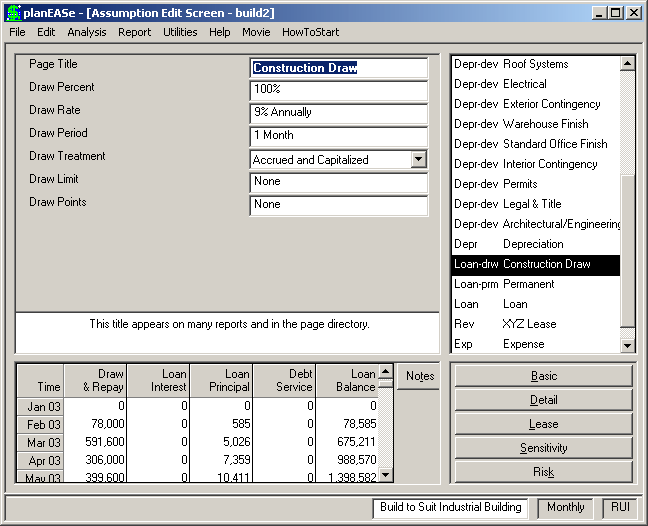
A Construction Draw Page is a Loan Page SubType generated by entering a Development Spending Dialog, accessed by choosing Edit/ Development Spending... This Page will only be generated if you have checked Generate Draws in that Dialog You cannot enter a Construction Draw Page in any other way. You can, however, edit any of the assumption values shown, once the Page has been generated by the Development Spending Dialog, and the Construction Draws generated in the resulting analysis will corre- spond to the edited values. Additionally, appro- priate assumption values of the Construction Draw may also be varied in Sensitivity and Risk analyses. You may discern a Construction Draw Page in the Assumption Page List by its Page Abbreviation: Loan-drw. The assumptions in a Construction Draw Page are:
DRAW PERCENT is the percentage of the eligible costs (the Development Item Cost entered in the Development Item Grid times the Draw percentage entered there) included in the Construction Draw Loan. For instance, an entry of 80% here would generate a draw of $72,000 for an item costing $100,000 when Draw is specified to be 90% for the Development Item. The entry is limited to 0-100%.
DRAW RATE is the Annual Interest Rate charged for the Construction Draw Loan.
DRAW PERIOD is the number of months of Development Spending that will be funded by this Construction Draw. For example, if you enter 3 months here, and $100,000 of spending is scheduled for the current month, $90,000 for the next month, and $80,000 for the following month, the Draw for this month will be $270,000, and no further draw will be scheduled until the 4th month following. This allows you to spread the draws, but will increase the interest cost of the loan, since money is drawn earlier than strictly necessary. No provision is made for earning interest on idle drawn money. Unless your loan source limits the number or frequency of draws, limiting this assumption to one month will benefit your project's rate of return. The entry is limited to 1-12 months
DRAW TREATMENT is the interest payment and tax treatment of the interest on the Construction Draw. In general, interest is either expensed (rare) or capitalized (normal). Construction Period Interest is accorded a special treatment in the current Tax Law, and is, generally, capitalized. The payment of interest may be either accrued (not paid until the Construction Draw Loan is repaid), or paid (paid currently as incurred). This choice allows you any combination of these treatments. If you choose a Draw Treatment for your Construction Draw Loan that capitalizes the Construction Period Interest, the interest is allocated to each Development Spending item for which the Draw column in the Development Spending Dialog is greater than zero in order to determine the amount to be added to the Depreciable Amount for that item in determining the annual depreciation. For example, if a Development Item of $100,000 is included in the draws, where the total Construction Period Interest is $27,000 and the total Development Items included in the Draws is $1,000,000, the Depreciable Amount (and Capital Spending) assigned to that Item will be $100,000, but the amount depreciated will be $100,000 plus $27,000*($100,000/$1,000,000), or $102,700.
DRAW LIMIT is the maximum amount allowed to be outstanding for the Construction Draw. This includes any accrued interest. A zero value eliminates any consideration of a limit. Once the limit has been reached (including accrued interest), further draws are not allowed.
DRAW POINTS is the fee sometimes charged by the originator for handling the loan. Values greater than 100 are assumed to be a dollar amount, while values of 100 or less are treated as a percentage of the Draw Limit. Thus an assumption value of 1.5 means that the borrower is to pay 1.5% of the Draw Limit to the originator. Draw points are charged at the inception of the loan, and are treated like loan interest, as specified in the Draw Treatment assumption.
The Draw Loan is repaid on the date shown in the until field of the draw loan specification. This field is restricted to be no less than the month following the Spend Date of the latest Construction Grid Item. For example, if the latest entry in the Spend Column is 8.01, then the earliest entry allowed in the until field is 9.01. Once you have approved the Development Spending Dialog (by pressing OK), the until date is incorporated in the Assumption Set as the Loan Origination Date for the Permanent Loan, and you may edit it there (under the same restriction). If you choose to not generate a Permanent Loan, you must recover the Development Spending Specification into the Development Spending Dialog (using Edit/Development Spending...) to edit the until field..
Sensitivity and Risk Analysis may be conducted with Loan Amount as the chosen Measure. If a Draw Loan has been specified, the Analysis will show the maximum loan balance during the life of the draw loan as the Loan Amount.