Investor’s Assumptions
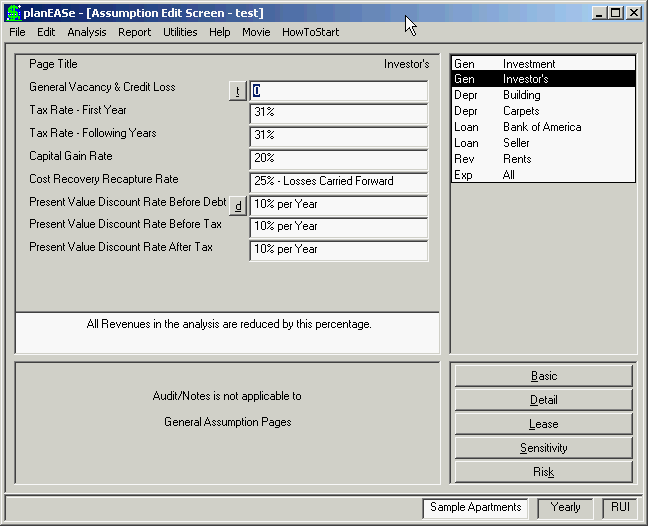
These assumptions describe the investor rather than the property itself. Because of the speed of planEASe in performing an analysis, it is easy to rerun analyses customized to individual investors if necessary. The individual assump- tions are:
GENERAL VACANCY & CREDIT LOSS allows you to specify a percentage which will lower all revenues in an analysis. This lower- ing will be in addition to any revenue losses due to physical vacancies specified through the use of the Vacancy Factor on Revenue Pages. This allowance also affects the calculation of physical vacancy for determining reimburse- ments. In all cases, the total of this General Credit Loss & Vacancy and the Vacancy Fac- tor on Revenue Pages is limited to be no greater than 100%. That is, entering a 50% here and a 60% Vacancy Factor for a particular Revenue will result in zero revenue for that particular Revenue. This assumption only affects revenues from pages with a Vacancy Factor assumption of their own. In other words, revenues from Rev-us (Unit Sales) pages are NOT affected (use the Price Multiplier on the Rev-usp Page for this).
TAX RATE - FIRST YEAR is the incremental rate at which the last dollar of the investor’s current income is being taxed during the first year of the analysis. This tax rate can be combined with state tax to yield a combined rate. In the example, the investor has a first year tax rate of 31%. There is a $25,000 annual loss allowed for certain real estate investments. If this tax rate is entered as a negative number, planEASe allows up to $25,000 of loss in the first year. In such case, all taxes are computed as if the entered rate was positive (that is, minus 31% is treated as a positive 31% rate).
TAX RATE - FOLLOWING YEARS is used to compute taxes for following years. In the example, the investor has a tax rate of 31% for years following the first year. There is a $25,000 annual loss allowed for certain real estate investments. If this tax rate is entered as a negative number, planEASe allows up to $25,000 of loss in the years following the first year. In such case, all taxes are computed as if the entered rate was positive (that is, minus 31% is treated as a positive 31% rate).
CAPITAL GAIN RATE is used to compute the tax on the Capital Gain at sale (over and above the Recapture of Cost Recovery). In 2003, the Federal Capital Gain Rate was lowered to 15%.
COST RECOVERY RECAPTURE RATE is the statutory tax rate applied at sale to the Cost Recovery (Depreciation) taken during the Holding Period. In 1997, this rate was created and enacted at 25%. It is applied to the smaller of the total Cost Recovery taken and the total Capital Gain. That is, if the Capital Gain is smaller than the total Cost Recovery, the 25% rate entered here will be applied to the Capital Gain amount (and the Capital Gain Rate becomes irrelevant).
Normally, planEASe considers all tax losses to be Passive and carries them forward until there is taxable income or gain from a sale against which to use the losses. However, if this Cost Recovery Recapture Rate is entered as a negative number, the system ignores the Passive Loss Limitation entirely and allows all losses as incurred, which may be appropriate if the investment is part of a portfolio where other passive income or gains are available to offset losses here. In such case, all taxes are computed as if the entered amount was positive (that is, minus 25% is treated as a positive 25%).
PRESENT VALUE DISCOUNT RATE BEFORE DEBT is used whenever planEASe is discounting cash flows computed before debt (and taxes). This is typically an extremely safe investment, and the rate should be set equivalent to long term returns expected of safe, long term, investments. One such measure is the interest rate being charged on prime commercial real estate loans, since they are backed by the collateral of the property itself.
PRESENT VALUE DISCOUNT RATE BEFORE TAX is used whenever planEASe is discounting cash flows computed after debt (and before taxes). This is typically an investment involving risk, since failure of the NOI to cover Debt Service can cause negative cash flows and possible loss of the property and investment. The rate should be set to be greater than prevailing interest rates, equivalent to long term returns expected of such risky investments
PRESENT VALUE DISCOUNT RATE AFTER TAX is used whenever planEASe is discounting cash flows computed after debt and taxes. The After Tax Rate is lower than the Before Tax Rate, since you expect to be taxed on your profits. For instance, an investor in a 30% tax bracket buying a bond yielding 10% expects a 7% return after tax.
REINVESTMENT RATE is requested if you are using the RUM Model and is not shown here. This is the rate at which the investor can reinvest cash thrown off by the property during the holding period. If you are performing after tax analysis, you should enter a rate here that reflects the investor's expectations after tax. Correspondingly, if you are looking at the investment on a before tax basis, the rate should reflect expectations before tax. There is a full discussion of using the Reinvestment Rate to compute the Modified Internal Rate of Return (MIRR) in the Discounted Cash Flow Theory Appendix on page 220.
SAFE RATE is requested if you are using the RUM Model and is not shown here. This is the rate at which the investor can safely invest money to fund negative cash flows generated by this investment during the holding period. If you are performing after tax analysis, you should enter a rate here that reflects the investor's expectations after tax. Correspondingly, if you are looking at the investment on a before tax basis, the rate should reflect expectations before tax. There is a full discussion of using the Safe Rate to compute the Modified Internal Rate of Return (MIRR) in the Discounted Cash Flow Theory Appendix on page 220.
The tax section in planEASe is merely meant to be representative of the results of the investment. For instance, the analysis does not account for crossing of tax brackets, or the possible application of the alternative minimum tax. The capital gain at the end of the investment, as an example, is taxed at the marginal rate even though the large size of the gain may well cause some or all of the gain to be taxed at a higher rate. The purpose of planEASe is to forecast the cash flows from, and tax liabilities of, investment real estate. If you are performing tax and/or financial planning for investors, that is properly the province of advisors in that area and/or tax planning software rather than this system. planEASe provides sufficient information in regards to the cash flows and tax consequences of the investment for input to such plans and/or software.
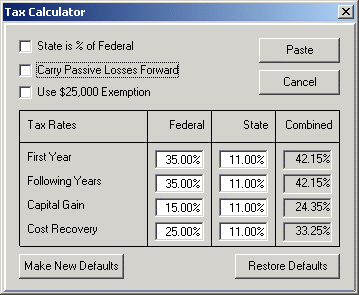
Tax Calculator A Tax Calculator as shown here is available from the t button alongside the top assumption on the Inves- tor's Page (or the Limited Partner's / Members' Page in the Partnership / LLC Models), allowing you to easily combine State and Federal Tax Rates and post them to your Assumption Set. The controls in this Calculator are:
State is % of Federal checkbox: Some States charge Income Tax as a percentage of the Federal Tax owed. If your investor is in such a State, check this box and enter the State percentage in the State tax rate boxes below.
Carry Passive Losses Forward checkbox: In 1986, Congress changed the Tax Law to require that losses on real estate investments be re-classified as “Passive” losses, and that passive losses must be carried forward to offset income from other such investments, given that the taxpayer has insufficient passive income currently. If your investor is subject to this provision (ie: is not a user of the property), and does not have sufficient passive income to offset the passive losses from this investment, check this box.
Use $25,000 Exemption checkbox: There is a $25,000 annual passive loss exemption allowed for certain real estate investments if passive losses are carried forward. If your investor is qualified to take this loss for this investment, check this option.
Tax Rates refers to the incremental rate at which the last dollar of the investor's current income is being taxed during the analysis. Currently, the maximum Federal Tax Rate is 35%. Federal tax rates can be combined with State tax rates to yield a combined rate. For instance, given a 35% Federal tax bracket for the investor, his California tax rate might be 11%. Since state taxes are deductible for federal tax purposes, his combined marginal tax rate would be 11% plus 35% of (100% minus 11%) or 42.15%.This table performs this combination for you, and posts the results to your Assumption Set when you press the Paste button. Specifically, the equations used to calculate the combined rates are: ! If State is not a % of Federal: ! (1-State) x Federal + State, and ! If State is a % of Federal ! (1-State x Federal) + State x Federal ! where State and Federal are both expressed as decimals (i.e.: 50% is.50)
The following buttons in the Calculator allow you to control how your work is (or is NOT) posted to your Assumption Set:
! Paste posts your calculations to the Assumption Set They are shown there in Italics to show you that there are calculations in this Calculator that lie in back of the values shown, and may, in turn, be accessed and changed by pressing the "t" button again. If there are NO calculations in this calculator, pressing Paste will return you to the Assumption Set, with the Tax Assumptions shown in normal font, denoting the lack of underlying calculations in this Calculator. ! Cancel cancels all current calculations in this calculator, and returns you to your Assumption Set with no changes. Another way to cancel the calculated tax rates while retaining them in your Assumption Set is to type a rate into one of the four tax rate fields in the Investor's Page of assumptions. Changing
any of these rates there will post the same rates to the other rate fields while clearing the calculator of the entries generating them. ! Restore Defaults restores the Federal Rate values to the default Federal Tax Rates and sets the State Rates to zero. If you do press the Restore Defaults button, it will also destroy any previous tax calculations that existed in your Assumption Set previously, unless you later press the Cancel Button. ! Make New Defaults takes the current calculated values and makes them the defaults for all new Assumption Sets. Concurrently, it sets the starting values for the Tax Calculator to the current values. This is useful if you regularly prepare analyses for investors or clients located in the same state. You may reset the default values for new Assumption Sets to the default planEASe values by accessing this calculator and pressing Restore Defaults and then this Make New Defaults button (in that order).
Investor Rate Defaults
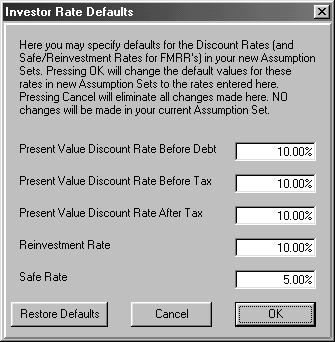
An Investor Rate Defaults Dialog as shown here is available from the d button alongside the Present Value Discount Rate Before Debt Assumption, allowing you to change the Default Values used in NEW Assumption Sets for the Investor's Preferences for various Discount Rates. These are the Starting Values for Rates shown on the Investor's Page (for the RU Model Series) and the Limited Partner's / Member's Page (for the RP Model Series).
The Buttons below the Rates function as follows:
! OK posts the rates as shown as the Default values for all new Assumption Sets.
! Cancel quits the Dialog without making any changes.
! Restore Defaults restores the Default Rates shipped with planEASe, ignoring any changes made in this Dialog.