Depreciation Assumptions
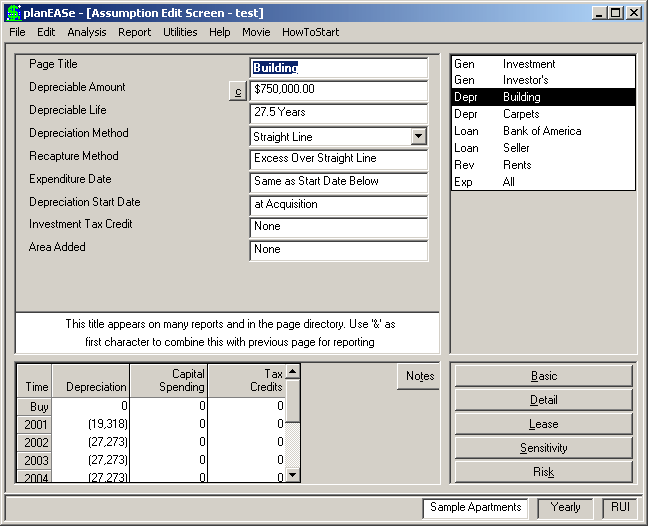
These assumptions are used to calculate the depreciation amounts shown in the Taxable Income Projection page of the analysis. While depreciation is not a cash flow item, it is a deductible expense, and therefore affects the tax amounts and both the Rate of Return and Net Present Value After Tax. Additionally, Depreci- ation Pages are used to set up any amortization schedules and capital expenditures you want to plan. There are several examples of these and other uses of Depreciation Pages in the How Do I Do section of this manual. Depreciation is a multiple page type, so you may include as many Depreciation Pages as you desire. For each Depreciation Page, the individual assump- tions are:
DEPRECIABLE AMOUNT is the dollar amount to be depreciated or amortized. If an amount of 100 or less is entered, the system treats it as a percent of purchase price. Thus the example amount of $750,000 for the Building shown here could just as well be entered as 75, and the results would be the same. Depreciation Pages starting after the Acquisition Date are assumed to be Capital Expenditures, and this amount is added to the “Investment and Sale” column of the output as an addition to the tax basis of the property and also as an expenditure of the corresponding amount of cash. Negative amounts may be entered, and the depreciation computes normally except reversed in sign.
The little c button to the immediate left of the Depreciable Amount field signifies that a Calculator is available for your use. Pressing the button or the c key opens the calculator, allowing you to enter the SqFt and $/Ft for the amount, which is useful for entering TI’s, Commissions, and other SqFt or Unit related values.
DEPRECIABLE LIFE is the number of years over which the amount is depreciated or amortized. Lives less than 1 year may be used, and result in no depreciation being computed. This is useful for Capital Expenditures for non-depreciable assets such as land. There are situations where the addition to tax basis discussed above is not appropriate, such as amortization. In these cases, you should avoid the addition to basis and the expenditure of cash by entering the Depreciable Life as a negative number. In this case depreciation is calculated as if the Life were the same positive number, but the addition to basis and cash expenditure does not occur. In other words, all amortization schedules should be planned using negative values for the life. For some depreciation methods, such as 15 and 18 year ACRS, life is a constant defined by our government. In these cases, planEASe corrects the life you enter here to the life required by the method you have chosen.
DEPRECIATION METHOD planEASe allows many depreciation methods, most of which are irrelevant under today's tax laws. The two methods used in analysis of today's investments are:
Straight Line all current tax laws use Straight Line Depreciation, no matter what the life or asset.
Straight Line, No First Half Period is useful when analyzing the continued hold of an owned property.
The 1986 Tax Reform Act mandated several averaging conventions which change the way depreciation is taken. Specifically, all personal property depreciation is subject to a “half year” convention where the first year depreciation amount is one half the amount allowed for the full year no matter when the property is placed into service. A half year deduction is allowed in the year of disposition again without regard to the actual time of disposition within the year. Similar rules apply to real estate depreciation except that the period is a “half month” instead of a half year. To further confuse things, personal property placed in service during the last three months of the year is subject to a “half quarter” rule rather than the half year rule if that property constitutes more than 40% of the aggregate basis of property placed into service that year (without regard to whether the asset is real estate or real estate related).
planEASe computes straight line, declining balance, and sum of the years digits according to these rules. To tell which convention to use, planEASe looks at the Depreciable Life. If the life is greater than 20 years, the half month rule is used. Otherwise the half year rule is used unless the depreciation starts in October or later, in which case the half quarter rule is used.
The following Depreciation Methods are NOT ALLOWED under Current Tax Law
Theoretical methods, included for your examination of their effects should they be contemplated for future tax laws are:
Sum of the Years Digits 125%, 150%, 175%, and 200% Declining Balance.
ACRS Methods listed below use ACRS tables in prior tax laws which have now been superseded by the straight line 27.5 and 31.5 year lives of the 1986 Tax Act beginning in 1987. The earlier tables are included in planEASe to facilitate planning for existing property which was acquired during the times that those tables were in effect.
ACRS personal property. The life used for the depreciation calculation is the Depreciable Life if you choose a depreciation life (3, 5, 10, or 15 years) for which there is a corresponding table. In accordance with the then current tax law, the system does not allow a cost recovery deduction in the year of sale for property being depreciated with the personal property method.
ACRS Real Estate Methods use the corresponding ACRS tables in effect during the early eighties. A proration of the cost recovery deduction is computed in the year of sale for these four depreciation methods.
Short Year Personal Property is meant only for taxpayers who come into being during the course of a tax year, and therefore have a “short year” in their first year of existence as defined by the IRS. Typically, this only relates to Partnership / LLC analysis. In this case, the corresponding ACRS Personal Property table relating to the life chosen is used, and the deductions are pro-rated as required by the IRS.
RECAPTURE METHOD controls depreciation recapture according to the methods shown in this table. The Low Income Housing method recaptures all depreciation in excess of straight line, but lowers the recapture amount by 1% for every month the property is held beyond 100 months. Therefore there is no recapture under this method if the holding period is 200 months or more. While Method 2 is not a recapture method, it is included for convenient use with amortization schedules, since unamortized amounts are typically deductible on sale. If you enter any negative number, planEASe will write off the remaining amount at the end of that number of years (or the end of the Holding Period, whichever is first). See the Tenant Improvement example on page 211
EXPENDITURE DATE is the date that planEASe uses to record the expenditure of the Depreciable Amount in the Investment and Sale column for a Depreciation Page starting after the Acquisition Date. If depreciation starts on or before the Acquisition Date, this assumption value is ignored. Otherwise, planEASe looks at this date. If this date is zero, planEASe records the expenditure on the Depreciation Start Date. If this date is not zero, planEASe records the expenditure on this date. This is useful for Capital Expenditures where the expenditure of funds spans two or more years. (See the Development Spending example on page 210).
DEPRECIATION START DATE is the month and year that depreciation starts, denoted as a planEASe Date. Enter zero for all Depreciation Pages starting on the Acquisition Date. For Capital Expenditures, enter the date when the depreciation is to start (typically the completion date or in-service date for the asset), and remember that in this case the depreciation amount is shown as spending in the Investment and Sale column of the reports unless you use a negative Depreciable Life.
INVESTMENT TAX CREDIT This assumption lowers the computed taxes in the year of the Depreciation Start Date by an amount equal to the entered percentage value times the Depreciable Amount. The amount of the Credit is subtracted from the “Taxes” column of the reports. Amounts greater than 100 are treated as dollars. If dollars are entered, the Depreciable Amount can be zero and the ITC will still be computed.
planEASe does not automatically reduce tax basis for the Investment Tax Credit (ITC). You must do this, if required by the tax law. For instance, if you have a Capital Expenditure of $50,000 subject to ITC of 10%, and you elect to take the entire Credit rather than reducing the Credit by two points to avoid the basis reduction, you should set up a Depreciation Page for $47,500 rather than the $50,000. At the same time, you must “gross up” the ITC in the Page from 10% to 10.526316% ($5,000/47,500). This takes care of the ITC just fine, but you must also remember that you’ve spent $50,000, and planEASe only sees $47,500 in Capital Expenditure. Therefore you must add a non-taxable Expense Page for $2,500 in the year of the Capital Expenditure to “balance the books”.
ITC is recaptured as follows: If the Depreciable Life is exactly three years and the Holding Period ends less than three years from the start of the Depreciation Page, recapture is computed and subtracted from the “Taxes” column of the After Tax Cash Flow Projection . The amount of recapture is 33% of the ITC if at least two years exist between the start of the Depreciation Page and the sale date, 66% if at least one year, and 100% if less than one year. If the Depreciable Life is five years or more and the Holding Period ends less than five years from the start of the Depreciation Page, recapture is computed as 20%, 40%, 60%, 80%, and 100% of the ITC if at least 4, 3, 2, 1, or less years respectively exist between the Depreciation Start Date and the date of sale. A zero Depreciable Life eliminates any recapture.
Two Depreciation Pages have been entered for the Sample Apartments. The first page, shown in the Building Depreciation Assumptions screen on page 86, depreciates $750,000 for the building over a 27.5 year life by
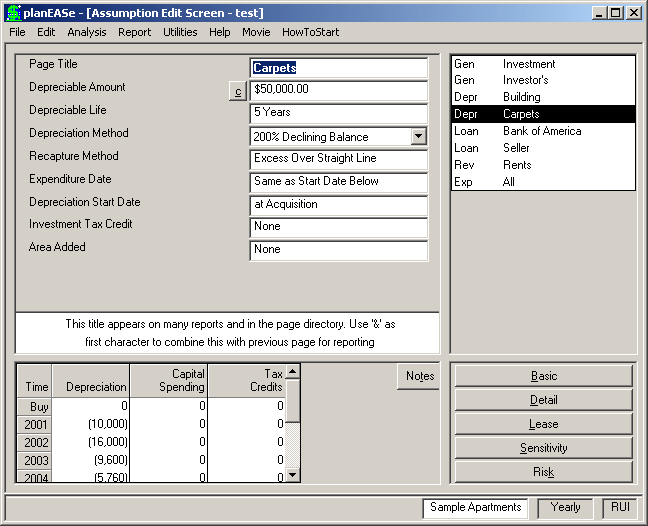
the straight line method. While 27.5 year depreciation is not exactly exciting, you might notice the amounts shown in this audit in the first and last years are not as much as you might expect. This is due to application of the half month rule. Because of this rule, the depreciation in the first year (covering the nine months from April through December) is prorated for eight and a half months rather than nine. Likewise in 2005, since the sale occurs on March 31, the deduction allowed is for two and a half months rather than three.
The second page, shown here, depreciates $50,000 of personal property (Carpets) for five years by the Double Declining Balance method (Depreciation Method 2.00). Again you can see the application of several of the assumptions and rules. Double Declining Balance of $50,000 normally means a $20,000 deduction in the first year, but the application of the “half-year” rule reduces the first year amount to $10,000. In 2005, application of the same rule allows a $2,880 deduction even though there are but three months of ownership in that year. The zero value for recapture causes all depreciation in excess of straight line to be recaptured at sale. Since the holding period is 4 years, we are entitled to $40,000 straight line depreciation during that time, and $4,240 of depreciation (shown as a positive amount) is recaptured.
Page SubTypes Each Multiple Page Type in planEASe, (Depreciation, Loan, Revenue, Fee and Funding) may have one or more Page SubTypes associated with it. In addition to the Depr-dev page detailed in the Development Spending Section at page 177, the following Page SubTypes are currently available for Depreciation Pages:
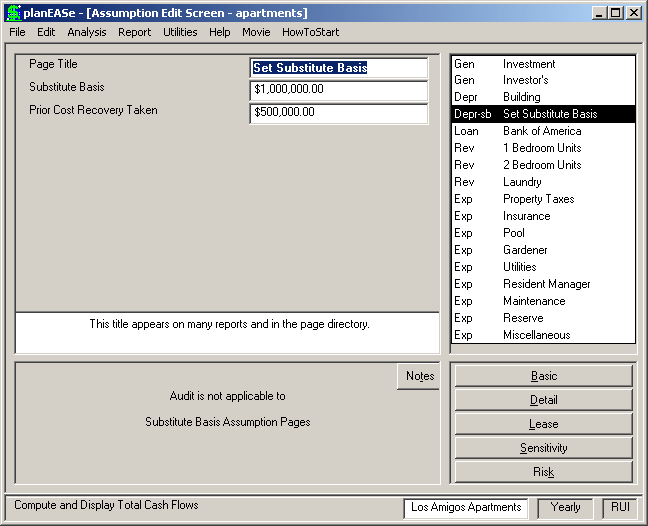
Substitute Basis Page A Substitute Basis Page is a Depreciation Page SubType which allows you to set the Substitute Basis and previous Cost Recovery Taken for the property. You may have only one Substitute Basis page in your Assumption Set. This page is typically used when the buyer is emerging from a 1031 Exchange. To add a Substitute Basis page, click on any depreciation page in the Assumption Page List and choose Edit/Add Substitute Basis Page. The assumptions on the page are:
SUBSTITUTE BASIS You may set the initial basis of the acquired property to whatever value you enter here. You may want to use the Exchange Recap module of the Financial Utilities to determine the Substitute Basis. Here we have chosen to enter a $1,000,000 Substi- tute Basis.
COST RECOVERY TAKEN Under the 1997 Tax Act, depreciation taken on an exchanged property should be taken forward and recaptured on the sale of the property exchanged into. If you have such depreciation for an exchanged property, you may enter it here. The amount will then be added to the Cost Recovery Recaptured in the Sale Report, together with a note showing the amount. $500,000 has been entered here.
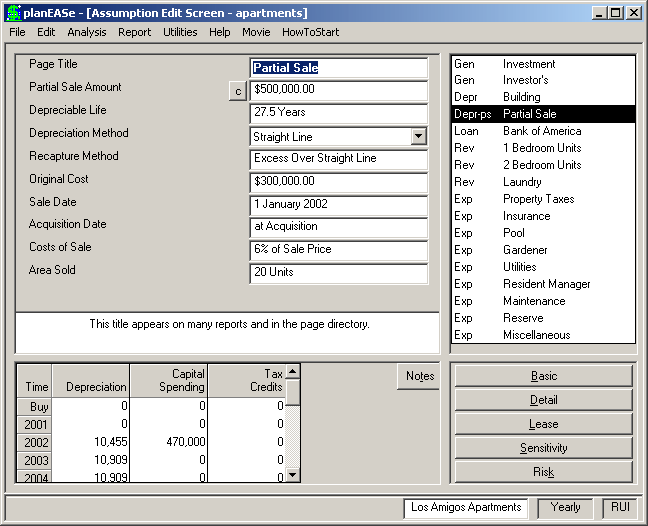
Partial Sale Page A Partial Sale page is a Depreciation Page SubType which allows you to sell a piece of the property during the Holding Period, leaving the remainder to be sold at the end of the Holding Period. You may have as many Partial Sale pages in your Assumption Set as you require. Typical usage might be for dispositions of extra land or structures during the Holding Period.
To add a Partial Sale page, click on any Depre- ciation page in the Assumption Page List, and choose Edit/Add Partial Sale Page. The as- sumptions on the page are:
PARTIAL SALE AMOUNT is the dollar sale price of the asset. $500,000 has been entered here.
DEPRECIABLE LIFE is as described in the Depreciation Assumptions section on Page 86. For dispositions of non-depreciable assets such as land, enter zero for the life.
DEPRECIATION METHOD and RECAPTURE METHOD are as described in the Depreciation Assumptions section on Page 86.
ORIGINAL COST is the $ cost of the property sold (as of the date of the asset acquisition)
SALE DATE is the Month and Year when the sale closes. Example - (4.02 is April 1, 2002). The date entered must be AFTER the Date of Acquisition. Dates on or before the Date of Acquisition cause the Partial Sale to be ignored in the analysis results.
ACQUISITION DATE is the Month and Year when the asset was acquired. Enter zero if it was acquired on the Date of Acquisition.
COSTS OF SALE is the percentage of the selling price paid out as costs of the sale. Amounts >100 are treated as dollars, so entering 6 means 6% of the Sale Price, as entered here.
AREA SOLD is interpreted as either Square Feet or Units, depending on the property type (as determined by the Square Feet / Unit Changeover value). The AREA SOLD updates the Size used for the Square Foot / Unit Income Statement on and after the SALE DATE
In calculating Partial Sales, planEASe treats the net proceeds of the sale before tax as “negative” Capital Spending. For instance, the proceeds will be seen as negative amounts in the “Investment and Sale” area in Basic Analysis and in the Capital Spending area in Income and Annual Statements. The Capital Gain and Taxes on the Capital Gain appear in the Capital Gain and Taxes area of Basic Analysis and the Taxes Due line
See also the following topics: Page
Land Acquisition .................... 210 Development Spending.............. 210 Tenant Improvements ............... 211 Exchange Basis.................... 140 in Income and Annual Statements. If the asset sold is being depreciated, planEASe computes “negative depreciation” for the asset after disposition so as to “cancel out” the corresponding depreciation.