Movie ( and HowToStart ) Menu
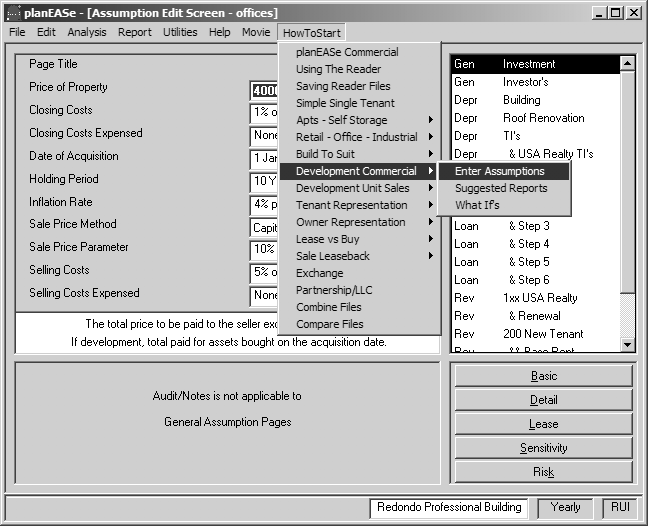
planEASe (and the Trial Version) contains short movies on Movie menus throughout the software, showing you how to perform many analysis functions at the time you are doing them. At the Assumption Edit Screen, shown here, the Movie menu is augmented by a HowToStart movie menu, displaying movies showing you how to start the various types of analysis of which planEASe is capable. Here, the HowToStart menu is being used to call the movie showing how to Enter Assumptions for a Commercial Development. There are about 300 movies available to help you to use planEASe. When you request a movie by pulling down a Movie menu and clicking on your choice, the planEASe MoviePlayer (Patent Pending) is called, initiating a search for your choice in the following order:
FIRST: We search for your movie choice on our Web Site. If you are connected to the Web and our site is available, the movie found there is played for you. This assures that you will be served the most current version of the movie you request, if available. You can tell that your movie is playing from our Web Site by reading the Title Caption in the movie window, which is “planEASe Web Movie Player” in this case.
SECOND: If you are NOT connected to the Web or our site is NOT available, we search for your movie choice on your CD (or DVD) drive. You can tell that your movie is playing from your CD Drive by reading the Title Caption in the movie window, which is “planEASe CD Movie Player” in this case. You can place the movies on your CD (or DVD) drive by inserting the Trial Version CD-ROM available free from us.
THIRD: If your movie choice is not found using the first two methods, we search for your movie choice in the Videos folder contained in the folder on your Hard Disk where planEASe is installed (by default, this is C:\planwin). If the movie is found there it is played for you. You can tell that your movie is playing from your Hard Disk by reading the Title Caption in the movie window, which is “planEASe Movie Player” in this case. To install the Videos folder on your Hard Disk, you may copy it from the Trial Version CD-ROM. It requires approximately 520 megabytes (ie: half a gigabyte) of storage.
FOURTH: If the planEASe MoviePlayer cannot locate the movie in any of the locations above, it displays a window telling you that, and suggests how you can fix the problem by inserting the Trial Version CD-ROM, or copying the Videos folder to your Hard Disk.