Permanent Loan Page
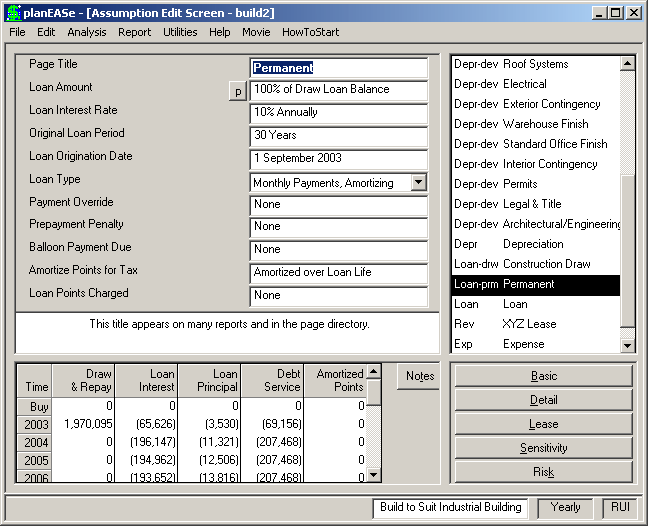
A Permanent Loan Page is a Page SubType generated by entering a Development Spending Dialog, accessed by choosing Edit / Develop- ment Spending.... This page will only be gener- ated if you have checked Generate Permanent Loan in that Dialog. You can not enter a Perma- nent Loan Page in any other way. You can, however, edit any of the assumption values shown, once the Page has been generated by the Development Spending Dialog, and the Perma- nent Loan generated in the resulting analysis will correspond to the edited values. Addition- ally, appropriate assumption values of the Per- manent Loan may also be varied in Sensitivity and Risk analyses. Other than Loan Amount, discussed below, all the assumptions are the same as the normal loan assumptions in planEASe. You may add Participation Loan provisions to a Permanent Loan just as you may to any other loan in planEASe, although any Permanent Loan specified will be the next loan in your Assumption Set following the Construction Draw Loan (if there is any such). Permanent Loan proceeds will automatically repay any Construction Draw loan balance, to the extent available. You may discern a Permanent Loan Page in the Assumption Page List by its Page Abbreviation: Loan-prm. The assumptions in a Permanent Loan Page are:
LOAN AMOUNT may be edited as you would expect, but the Method determining the amount may NOT. The method, as chosen in the Development Spending Dialog, may be any of:
! % of Total Draw Loan Balance. including accrued interest, if any. ! % of Cost at Completion. The Cost at Completion is the sum of the Price of Property, all Development Spending Items, and any Capitalized Construction Draw Interest. ! Specific Dollar Amount ! Debt Coverage Ratio. The chosen Debt Coverage Ratio will be for the year the Permanent Loan starts. Thus, if you choose this method, you may want to extend the until date of the Construction Draw loan until the beginning of the year following construction completion
If you want to change the Method determining the Loan Amount, you must access Edit/Development Spending... and change the Method (and Parameter?) there.
The remaining assumptions for the Permanent Loan are the same as the normal loan assumptions. However, for the Loan Origination Date assumption, the Permanent Loan may not commence before the date shown in the until field of the draw loan specification. This field is restricted to be no less than the month following the Spend date of the latest Construction Grid Item in the Development Spending Dialog. For example, if the latest entry in the Spend Column is 8.01, then the earliest entry allowed in the Loan Origination Date is 9.01.