Entering Leases into planEASe
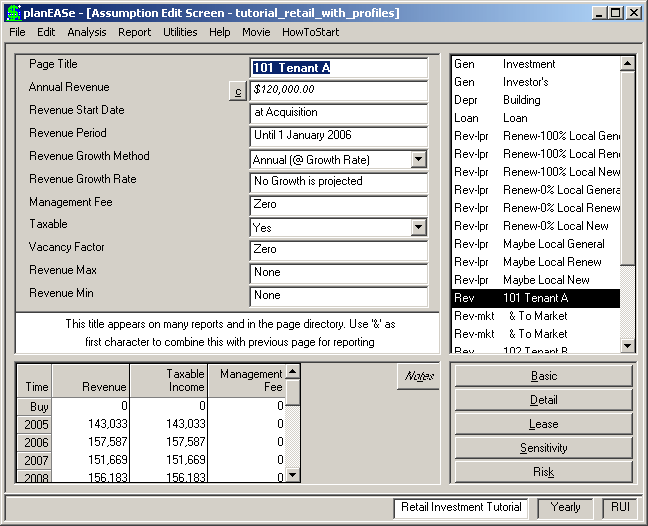
When using either or both Reimbursements or Market Profiles, it is necessary to enter Leases in a particular fashion, with the Revenue Pages describing the lease in a particular order, as described below. Failure to do this will result in an incorrect Revenue projection for the lease.
The First Revenue Page for the lease must: ! Have an Assumption Page Title not begin- ning with “&”. If the Title begins with a number, planEASe will treat the number and all characters that follow until the first space as the Suite Number in reports and all char- acters after that space as the Tenant Name. ! Have the Square Feet and $/sf/year (or /month) entered in the Revenue Amount Calculator (otherwise planEASe doesn’t know the SqFt of the space, and assumes it doesn’t exist!) ! Have a Revenue Start Date of either the Acquisition Date or, if the space is not available at the Acquisition (such as in a development project) the first month that the space is available for occupancy. If the space is not occupied on that date the space should be entered with a 100% Vacancy Factor. ! The Revenue Period should end after the Acquisition Date and the Revenue Start Date must be before the end of the Holding Period. If either of these requirements are not met, the Tenant cash flows associated with the lease will not appear in any of the reports.
If the Revenue Period on the first Revenue Page for the lease does not end on or after the end of the Holding Period, the next and following Revenue Pages must be Continuation Pages, planning the Base Rent for the lease, and continuing either until the lease ends or the end of the Holding Period is reached. A new Continuation Page must be used (added) every time any of the Revenue Assumptions changes. For instance, a change in Vacancy Factor or Revenue Growth Rate, or any other Revenue Assumption causes you to add a new Continuation Page starting at the date of the change and lasting until the next change.
If the end of the Holding Period has not been reached after planning the Base Rent for the lease as above (ie: the lease ends), the lease planning should continue until the end of the Holding Period in one of several ways: ! Take the lease to Market using a To Market Page as described above, or ! enter more Continuation Pages (describing a renewal) until the end of the Holding Period is past, or ! cease planning for the space (perhaps due to a Partial Sale), or ! continue planning the space as 100% vacant, or ! continue planning the space with a new First Revenue Page reflecting a new tenant (starting at that future date) and following the rules above. In addition to new tenants, a new lease must be begun at any time the space changes Square Footage, whether the tenant changes or not. planEASe picks up the Square Footage from the Calculator on the First Revenue Page for the lease, and that is the only way to change the Square Footage for a lease.
Following all this, if there are other costs associated with the lease, (for instance, deposits or one-time costs/revenues or parking fees) you may add SubPages following the last Base Rent page, be it a To Market or Continuation Page.
In all this section the Holding Period cited should be construed as the maximum Holding Period Assumption Value you will use while analyzing the project/property (plus one year if using the Cap Next Year's NOI Sale Price Method)
Continuation Pages start when the previous Page ends, so they are “Order Dependent”. That is, if you move a Continuation Page from its spot in the Assumption Page List, you completely change when it occurs and what it does.
When using Reimbursements, you must plan every space for every period of time. If, for instance, you simply start planning for a lease 6 months after acquisition, the following things happen: ! the space will not show up on your APOD and RentRoll Reports ! the space “disappears” in planEASe, and all other tenants’ “ProRata” share of the property is therefore overstated. Instead, start the lease at Acquisition with a 100% Vacancy Factor for a 6 month Revenue Period and add a Continuation Page (or To Market Page) to plan the initial lease, and both problems disappear.