Market Profiles Dialog
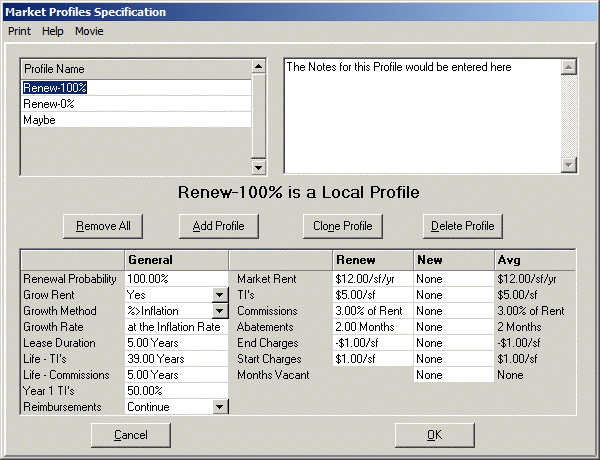
Market Profiles allow you to specify, in general, how leased space will be re-leased when the lease you have entered expires. This decreases the amount of time you spend entering leasing assumptions be- cause, instead of typing the same values for every tenant, you can enter the projected market values once and reference them (through To Market Pages) for all tenants who share similar characteristics. You may access this Market Profiles Dialog by pulling down Edit/Market Profiles... at the Assumption Edit Screen. The first Profile (named Main by default) is automatically generated for you the first time you access this Dialog in an Assumption Set. You may rename Main if you prefer by clicking on it in the Profile List and typing the new name.
Profile Types ! Local Profiles are part of the Assumption Set. There must be at least one Local Profile in an Assumption Set before you will be allowed to direct any leases to any Profile. If you delete any Profile to which a lease is directed, the lease will be redirected to the first Local Profile in the Assumption Set. ! Global Profiles are part of the planEASe installation, and will be made available to you for any multi-tenanted property. If you change a Global Profile, it will be changed in all of your properties. Global Profiles are stored in a file called Global_Profiles.dac, saved in your C:\planwin (or other) home folder. You may move this file to another planEASe installation as you wish, to make your Global Profiles available on another computer. Only one such file is allowed for each planEASe installation. Within Global_Profiles.dac, you may save as many Global Profiles and % Variant and $ Variant Profiles depending on them as you want. ! % Variant profiles vary from the specified Local or Global Profile by the specified % amount. For example, a Market Rent value of 60% in the New Column of this profile type causes the Market Rent of any leases directed to it to be 60% of the New Market Rent in the specified Local or Global Profile. ! $ Variant profiles vary from the specified Local or Global Profile by the specified $ amount (either positive or negative). For example, a Market Rent value of minus.60 $/sf in the New Column of this profile type causes the Market Rent of any leases directed to it to be.60/sf less than the New Market Rent in the specified Local or Global Profile.
Profiles contain the following Information ! Renewal Probability is used to weight the new and renew values for this profile. eg:60% means 60% of the Renew TI's value will be weighted with 40% of the New TI's value. Renewal Probability is used to compute weighted values for Market Rent. TI's, Commissions, Abatements, End and Start Charges, as well as Months Vacant. In the case of Months Vacant, the Renew value in the weight is assumed to be zero. ! Grow Rents You may inflate the Market Rent during the lease or leave it constant. If you choose No, the Market Rent will be constant during the Lease Duration. Choosing Yes will cause the Base Rent to increase annually during the Lease Duration at the rate chosen below. ! Growth Method can be %, %>Inflation, or $/sf/year. % will grow the profile dollar values at the chosen Growth Rate. %>Inflation grows the profile dollar values at the chosen Growth Rate PLUS the Inflation Rate. $/sf/year grows the profile dollar values at the specified $/sf/year annually.
! Growth Rate the interpretation of this value depends on the Growth Method chosen. If the Growth Method is %, then this field is interpreted as the Annual Growth Rate, regardless of inflation. eg: entering 3 means 3% per year no matter what the Inflation Rate is. If the chosen Growth Method is %>Inflation, this field is interpreted as an addition to the Inflation Rate You may choose a negative rate here, and the rate will be SUBTRACTED from the Inflation Rate to get the Growth Rate. ! Lease Duration is the number of years (may be fractional, and fractional amounts will be rounded up to the nearest month) the lease (either new or renewal) will last. After the end of the projected lease, if the Holding Period has not expired, the space will be re-leased according to the same rules, with dollar values inflated to the new re-lease time. ! Life - TI's is the number of years over which the TI’s specified by this profile will be depreciated. Normally this is 39 years, but you may enter any number of years you wish (including 1 year to write them off currently). ! Life - Commissions is the number of years over which the Commissions specified by this profile will be depreciated. Normally this is the term of the lease plus any scheduled renewals, but you may enter any number of years you wish (including 1 year to write them off currently). ! Year 1 TI's is the percentage of the TI’s permitted to be written off in the year in which they are completed. In 2002, Congress passed the tax law allowing 30% of certain TI’s to be written off in the year of completion. In the tax law passed in 2003, this was increased to 50%. See Tenant Improvements on page 211 ! Reimbursements may be set to either Continue or None or Cont w/BY Adj or Cont w/BY&$ Adj. Continue simply continues the same reimbursement pattern previously specified for this space. None turns off all reimbursements for the space. Cont w/BY Adj. continues the same reimbursement pattern previously specified, adjusting the Base Year stop amount for any Base Year reimbursed expenses to the first year of the new Lease Duration. Cont w/BY&$ Adj does the same thing as Cont w/BY Adj, but also adjusts any $ Stop reimbursed expenses to a Base Year stop amount of the first year of the new Lease Duration. This is useful for correcting $ Stop amounts to Base Year Stops at lease end. The following Rates, contained in all profiles, are combined in determining the Rates to continue the leasing of the specified space, by weighing the Renewal Rate times the Renewal Probability plus the New Rate times (1 minus the Renewal Probability). For example, a Renewal Rate of $4.00 and a New Rate of $5.00 is combined with a Renewal Probability of 60% as $4.00 x.60 plus $5.00 x.40, or $4.40. When combining rates, planEASe will not allow any rate (before combining) to be less than zero. Thus, a Local Profile Rate of $4.00/sf for New TI's, when combined with a $Variant Profile Rate of ($6.00)/sf will be recorded as $0.00/sf before being weighted with the corresponding rate for Renewal TI's. The combined number of months for Abatements and Months Vacant is rounded to the nearest month (eg: 4.6 months is rounded to 5 months). For your reference, the combined rates computed by these rules are shown in the final (Avg) column of the Profile.
All dollar rate values listed below should be entered in TODAY'S dollars, since planEASe will automatically inflate them to the start date of the lease using the Growth Rate and Method chosen.
! Market Rent (Renew & New) is the Market Rent to be used for New or Renewed Tenants. If you choose Yes for the Grow Rents option above, the annual Base Rent for the space will grow according to your chosen Growth Method option. Otherwise, the Base Rent will be constant until the next Renewal/New option after the chosen Lease Duration. ! TI's (Renew & New) is the TI's to be used for New or Renewed Tenants. ! Commissions (Renew & New) is the Commissions (expressed as % of Base Rent for the Lease Duration) to be used for New or Renewed Tenants. ! Abatements (Renew & New) is the Abatements (expressed in Months) to be used for New or Renewed Tenants (also known as Free Rent). ! End Charges (Renew & New) is the charges incurred at the end of the lease to be used for New or Renewed Tenants. If you choose Yes for the Grow Rents option the End Charges will grow according to your chosen Growth Method option.
! Start Charges (Renew & New) is the charges incurred at the start of the lease to be used for New or Renewed Tenants. ! Months Vacant (New Only) is the Months Vacant to be used for New Tenants. Renewed Tenants are presumed to be renewed with zero Months Vacant.
Profiles may be controlled by ! Profile List (at the top left of the Dialog) controls which profile you are viewing. You may choose the profile viewed by clicking on the profile name. ! Profile Comments (at the top right of the Dialog) shows the comments (if any) you have entered to describe the profile. Profile Comments are saved with the first Assumption Page for the profile, and displayed in the Assumptions Report (if the show notes checkbox is checked when viewing the Assumptions Report). ! Profile Grid (occupying the center bottom of the Dialog) shows the values entered in the profile viewed, so that you may review and/or change them. ! Remove All Button allows you to remove all profiles from your Assumption Set. At the same time, all To Market Pages will be removed, so there will be nothing remaining of the Local and To Market Pages previously entered. The Global Profiles (and variants depending on them) will be removed from the current Assumption Set, but will still be available for other Assumption Sets (and this one if you later access Edit/Market Profiles from the Assumption Edit Screen. ! Add Profile Button allows you to add a profile to those already existing. Unlike other areas of planEASe, you may only add profiles to the end of the Profile List rather than inserting them. ! Clone Profile Button allows you to copy all values in an existing profile to a new profile under a new name, thereby saving you the time of setting the values if the new profile values are close to the profile being cloned. Variant Profiles may not be cloned. ! Delete Profile Button deletes the Profile currently highlighted in the Profile List. If a Local or Global Profile is currently highlighted, you must delete all Variant Profiles varying that Local/Global Profile before deleting the Local/Global Profile. You are not permitted to delete Market Profile Pages through Edit/Delete Page at the Assumption Edit Screen, so the only way to delete a profile is from this button. ! Cancel Button cancels all changes made since the Dialog was opened and restores your Assumption Set to its status prior to opening the Dialog. ! OK Button posts all changes to the profiles in your Assumption Set. When you press the OK button, the Dialog disappears, and the Profiles, as currently defined, are entered into your Assumption Set. Local and Global Profiles are posted as 3 Pages each: one for the values entered in the General column of the Grid, one for the values in the Renew column, and the last one for the values in the New column. All 3 pages are denoted as Rev-lpr for Local Profiles, and Rev-gpr for Global Profiles. The Page Titles show the difference between the General, New and Renew Pages.
Any %Variant and/or $Variant Profiles are entered into your Assumption Set as 2 Pages each, the first for the values in the Renew column, and the second for the values in the New column. Both pages are denoted as Rev- %pr for %Variant Profiles, and Rev-$pr for $Variant Profiles. The Page Titles show the difference between the New and Renew Pages.
The Profile Pages in your Assumption Set are treated differently from the other Pages. First, you may not move, copy, cut or paste these Pages. Secondly, you may not use Edit/Transfer Pages... to copy these pages from one Assumption Set to another (you may, however, use the Profiles Menu Option in Edit/Transfer Pages... to copy all Local Profiles from one Assumption Set to another... see page 17). Finally, you may not change the Page Title for these pages from the title automatically assigned by planEASe. You may, however, change any of the values displayed on these Pages, and the changes will be reflected in the Profiles whenever you recover them into the Market Profiles Dialog. You may also choose them as Sensitivity or Risk Variables when specifying a Sensitivity or Risk Analysis.
When using Market Profiles for a property analysis, we suggest you should NOT use the default Capitalize Current NOI Sale Price Method. Since this Method capitalizes the NOI in existence at the Sale Date, it may well occur at a time when the Profiles have scheduled vacancies, and therefore understates average NOI. The preferable approach is to use either Capitalize Last Year's NOI or Capitalize Next Year's NOI for the Sale Price Method.
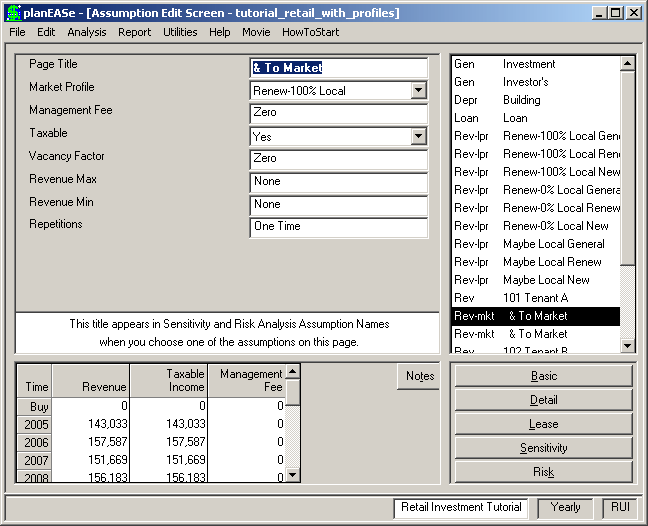
Implementing Market Profiles - Adding To Market Pages It is not enough to specify Market Profiles. Without directing the leases in your Assump- tion Set to a particular Profile, the Profiles will not affect your calculations. You direct leases to Market Profiles by adding one or more To Market Pages to the Base Rent specification for each lease you want to be calculated via the chosen Market Profile after the expiration of your Base Rent specification. You will be offered the opportunity to add a To Market Page (via Edit/Add To Market Page) whenever the following conditions are met: ! There are Market Profiles in your Assumption Set, and ! You have highlighted a Revenue Page in the Assumption Page List, and ! The Page after the Highlighted Page is not a Continuation Page, and ! The highlighted Page is either a Continua- tion Page, another To Market Page, or the first Page for the concerned lessee and there are no Continuation Pages following. Despite these restrictions, it is still possible (through Edit/Page Delete and other instructions) to wind up with Continuation Pages immediately following a To Market Page. Any such Continuation Pages will not affect calculations, since the To Market Pages continue until the end of the Holding Period, and therefore, the following Continuation Page(s) occur after the end of the Holding Period. The assumptions on a To Market Page are:
MARKET PROFILE offers you a list of the Market Profiles in your Assumption Set so you may choose the appropriate one.
The MANAGEMENT FEE, TAXABLE, VACANCY FACTOR, REVENUE MAX, and REVENUE MIN assumptions have the same usage as the correspondingly named assumptions discussed in the Revenue Assumptions section beginning on Page 97
REPETITIONS allows you to choose how many times the Market Profile will be applied before the next To Market Page profile (if any) is applied. A value of 99 (the default) is interpreted as Until Projected Sale.
When using Market Profiles for a property analysis, we suggest you should NOT use the default Capitalize Current NOI Sale Price Method. Since this Method capitalizes the NOI in existence at the Sale Date, it may well occur at a time when the Leases have scheduled vacancies, and therefore understated average NOI. The preferable approach is to use either Capitalize Last Year's NOI or Capitalize Next Year's NOI for the Sale Price Method.