Revenue Assumptions
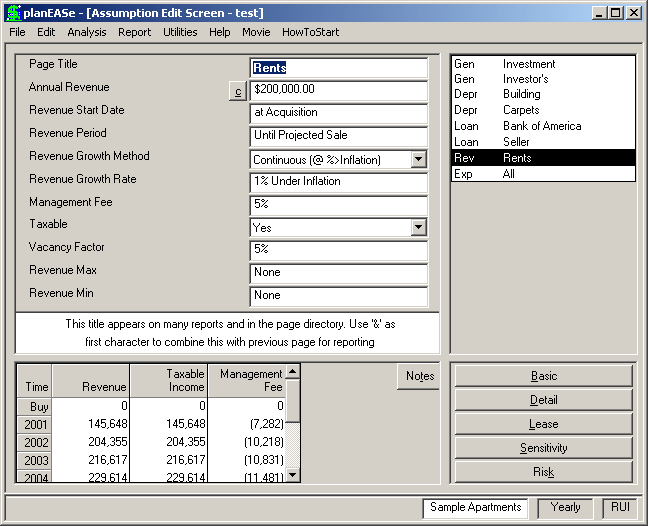
These assumptions are used to calculate the Effective Income and Management Fee dis- played in the Taxable Income Projection and Before Tax Cash Flow Projection pages of the Basic Analysis. Using Revenue Pages, you may plan revenues that grow at variable rates, lease forecasts for each lessee in the property, variable vacancies and vacancy rates, and pass-through revenues. There are examples of how to accom- plish these and other purposes with your Reve- nue Pages in the How Do I Do section of this manual. Revenue is a multiple page type, so you may include as many Revenue Pages as you desire. For each Revenue Page, the individual assumptions are:
ANNUAL REVENUE is the amount of revenue expressed as an annual (NOT monthly) amount. Amounts of 100 or less are treated as a percent- age of the purchase price. Negative amounts may be used, and subtract from total revenues. An Annual Revenue of 0.00 causes the revenue to not be computed, except for Continuation Pages where a zero value causes planEASe to use the ending amount of the previous Revenue Page for the Annual Revenue of the current page.
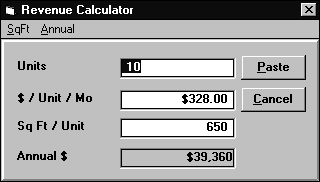
The little c button to the immediate left of the Annual Revenue amount signifies that a Calculator is available for your use. If you click on the button (or press the c key) the Calculator window shown here appears. As shown in the menu bar, you can set the calculator to operate with either $/SqFt or $/Unit, and either Annual or Monthly rates. Once set, if you recall the calculator it remembers how you want to calculate (and your latest entries). The amount shown on the Assumption Page is changed into italics so you can tell that a calculated amount lies in back of the amount shown.
REVENUE START DATE is the month and year when the revenue starts, denoted as described in the Date of Acquisition assumption. If entered as zero, the revenue starts on the Date of Acquisition. A Revenue Start Date of -1.00 is used for Continuation Pages, which causes planEASe to start the revenue at the end of the previous Revenue Page. When you are processing a Tenant or Owner Representation Assumption Set (Price Of Property is set to 1 or 2), entering a value of “99” in this Revenue Start Date field causes a date of “at End of Lease”. This is used together with the One-Time Growth Method to enter an Amount in the Annual Revenue field that occurs at the end of the lease being entered.
REVENUE PERIOD is the number of years that the revenue continues. A fractional value less than one, such as.5 years, causes planEASe to compute that fraction of the Annual Revenue and receive it starting on the Revenue Start Date. If the Revenue Period extends fractionally into a year, planEASe assigns that fraction of
the Annual Revenue to the year involved. Alternatively, you may enter a negative number here (like -7.04), and planEASe will interpret it as the date when the revenue ends (July 1, 2004 in this case).
A value of “99" is interpreted as “Until Projected Sale”, insuring that the Revenue will last throughout the Holding Period. A zero value establishes the Revenue Page as a Start Date for a Revenue stream that you may follow with Continuation Pagesand/or To Market Pages to describe the further revenues for the space. Additionally, you may establish a reimbursement pattern for the space in the Reimbursements Dialog and that pattern will be followed by the revenues described in these following Pages (and modified as directed by the Reimbursements field in the appropriate Market Profiles. In order to use a Revenue Page in this fashion, it must have a Zero Revenue Period, a SqFt or Unit Value and a positive Dollar Rate entered in the Annual Revenue Calculator, and a Revenue Start Date at or after the Acquisition Date. In this case, The $ amount shown in the Annual Revenue field is irrelevant, and does not show in any reports.
REVENUE GROWTH METHOD You may choose any of the growth methods detailed in the Growth Method Discussion section on page 114.
REVENUE GROWTH RATE controls revenue growth during the Revenue Period. Depending on the Revenue Growth Method chosen, this value is treated either as an annual percentage growth rate (for Growth Methods denoted as (@ Growth Rate)), as an addition to the Inflation Rate (for Growth Methods denoted as (@ %>Inflation)), or as a Dollar Amount (for Growth Methods denoted as (@ $/Year)). For the Sample Apartments, the assumed value of minus 1% together with the specified Continuous Revenue Growth Method means that planEASe inflates the revenue at the assumed Inflation Rate of 7% less 1%, or 6% annually, so whenever the Inflation Rate assumption is varied, the growth rate of these revenues automatically varies correspondingly. A zero value is treated either as zero growth, or as growth at exactly the Inflation Rate, depending on the Revenue Growth Method chosen.
MANAGEMENT FEE handles the situation where the investor hires a property management firm to manage the property. In the example, the investor plans to hire a firm to manage the property for a fee of 5% of the revenues. Management Fees are included in the “Operating Expense” column of the output, even though they are specified as part of the Revenue Assumptions. Because of this, the Management Fee assumption can also be used to specify expenses as a percent of revenues. For instance, an assumption value of 30.00 here would result in Operating Expenses of 30% of the Revenues due to this Revenue Page, growing at the same rate. Management Fee may also be planned as a separate expense not linked to Revenue Pages. See the Apartments.ru Assumption Set for an example of this.
TAXABLE Choosing No excludes these revenues from the Taxable Revenue in the Taxable Income Projection . This should be used to plan any revenues which are not taxable. The usual (and default) choice is Yes
VACANCY FACTOR is the average percentage of the space expected to be vacant during the Revenue Period. The Sample Apartments are assumed to be 5% vacant during the entire holding period, thus lowering the projected revenue by that percentage. Variable vacancy rates may be planned by using Continuation Pages. In all cases, the total of this General Credit Loss & Vacancy on the Investor’s Page and the Vacancy Factor on Revenue Pages is limited to be no greater than 100%. That is, entering a 50% there and a 60% Vacancy Factor for a particular Revenue will result in zero revenue for that particular Revenue.
REVENUE MAX allows you to specify an amount which is the maximum annual dollar amount or annual growth rate for this Revenue Page, no matter what the other assumption values. If this assumption is zero, there is no maximum amount. If this assumption is greater than 100, the amount of revenue computed for this page never exceeds the amount of this assumption. If this assumption is not zero and 100 or less, the value is treated as a cap on the Revenue Growth Rate. That is, a value of 8 entered here assures that the growth rate for these
See also the following topics: Page
Percentage Rents..................... 103 Expense Reimbursements.............. 103 Market Profiles........................ 108 Lease Forecasting ..................... 207 Import NOI ........................... 207 Variable Growth Rates ................. 208 Chart of Accounts ..................... 208 Use 99 for the Revenue/Expense Period... 207 Continuation Pages are wrong........... 207 Vacancy/Credit Loss is wrong........... 169 Entering Leases into planEASe .......... 112 revenues never exceeds 8% annually no matter what values are entered for the Inflation Rate and Revenue Growth Rate. This is useful for analyses involving Rent Control areas. If the Annual Revenue is negative, a negative amount here greater than 100 caps the negative revenue.
REVENUE MIN is the same as Revenue Max except that it specifies the minimum amount or growth rate for this Revenue Page. If this assumption value is greater than the non-zero Revenue Max, then neither assumption will affect the analysis.
Only one Revenue Assumption Page has been entered for the Sample Apartments, and those assumptions are shown in the “ Rents Revenue Assumptions” screen on page 97. As shown there, the current rents as of the April 1 acquisition are $200,000 per year, planned to grow continuously at 1% less than the Inflation Rate (Continuous (@ %>Inflation)). Since the Inflation Rate is 7% (see the Investment Assumptions), this revenue increases 6% each year. The “at Projected Sale” shown for Revenue Period is caused by entering 99 for this assumption, and is simply a conveniently large number to indicate that the revenues from this page should continue to the date of sale (as long as that date is within 99 years of the Revenue Start). A 5% vacancy allowance is subtracted from the Annual Revenue and a 5% Management Fee is planned. These assumptions cause the revenue and management fee amounts shown in the Audit Window. The amounts are computed using the methodology for Continuous Growth detailed in the Growth Method Discussion on page 114.
Page SubTypes Each Multiple Page Type in planEASe, (Depreciation, Loan, Revenue, Fee and Funding) may have one or more Page SubTypes associated with it. Revenue has twelve Page SubTypes:
! Unit Sales Pages (Rev-us) Described in detail in the Unit Sales Development section on page ?, these Pages allow you to enter individual sales of units in a Unit Sales Analysis Assumption Set.
! Market Profile Pages use ten different Page SubTypes to store and display the Market Profiles in your Assumption Set.
! To Market Pages (Rev-mkt) A To Market page allows you to choose the Market Profile you want a particular lease to revert to after the planned Base Rent for that lease expires (see the discussion of Market Profiles - and To Market Pages - starting on page 108).