Loan Assumptions
Loan assumptions are used to calculate the Interest Payments shown in the Taxable Income Projection page, and the Debt Service shown in the Before Tax Cash Flow Projection page of the analysis. planEASe can handle variable rate loans, refinancing, assumption of existing loans, negatively amortizing loans, deposit reserves, and many other financing situations through use of these assumptions. There are several exam- ples of these and other uses of Loan Assumption Pages in the How Do I Do section of this man- ual. Loan is a Multiple Page Type, so you may include as many Loan Pages as you desire. For each Loan Page, the individual assumptions are:
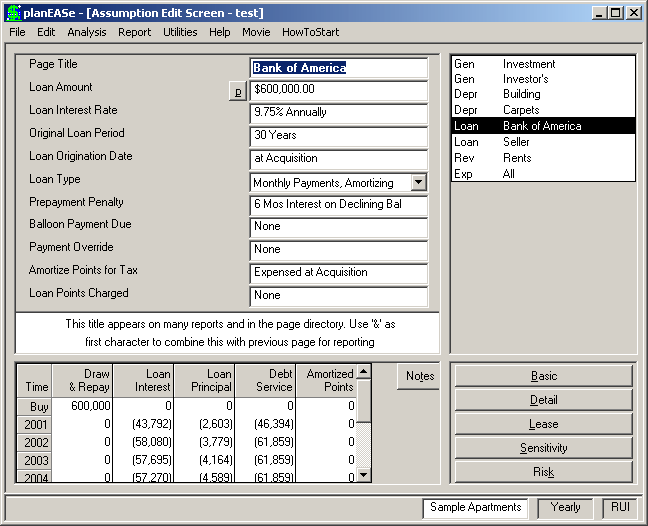
LOAN AMOUNT is the face value of the debt instrument, or the amount borrowed. The Sample Apartments are financed by a $600,000 first trust deed (Bank of America), and a $200,000 second trust deed (Seller, shown later in this section). Amounts less than 3 are treated as a desired Debt Coverage Ratio, and cause planEASe to compute and use a Loan Amount that will result in that DCR in the first year of the loan. Amounts of 3 or greater and 100 or less are treated as a percentage of the purchase price, so a Loan Amount of 60 would achieve the same result as the $600,000 shown here. A negative value for this assumption computes normally, but with negative values. This feature may be used to include loans from the investor to other parties (such as deposit or other reserves) if desired. A Loan Amount of 0.00 will normally cause the loan to not be computed except for Continuation Pages where a zero Loan Amount causes planEASe to use the ending balance of the last loan page for the Loan Amount of the current schedule. See the discussion of variable rate loans on page 212 for examples of this capability.
LOAN INTEREST RATE is the percentage interest rate stated in the note. For the example, the Bank of America loan is being taken at 9 3/4%. This interest rate is divided by the payments per year specified in the Loan Type (see below) to determine the interest charged per payment. Thus a 12% interest rate implies 1% per month for monthly payments, 3% per quarter for quarterly payments, and so on.
ORIGINAL LOAN PERIOD is the number of years until maturity for the note. The Bank of America loan is a 30 year loan. This assumption value must be greater than zero, or the Loan Page is ignored. This assumption value is used in conjunction with the Loan Amount and the Interest Rate to establish the monthly payment for the loan for Amortizing Loans unless the Payment Override is used. If the Payment Override is used, that payment amount is used instead, and this assumption is used only to establish when the loan is due. planEASe can handle assumption of existing notes. In this case, this assumption value should state the original maturity rather than the number of years remaining until maturity, and the Loan Amount should be the original face amount of the loan. For such cases, planEASe amortizes the loan up to the Date of Acquisition and assumes the amount outstanding at that time.
LOAN ORIGINATION DATE is the month and year the note originated. The Bank of America loan is new at acquisition, so the origination date is the same as the purchase date, April of 2001 (just as with depreciation,
this date defaults to the Date of Acquisition if a zero value is entered). If Bank of America were an existing loan to be assumed, this assumption should show the original month and year in which the note was created. planEASe can also project refinancing by use of this assumption. For instance, if an origination date of 5.02 were used, the loan would start in May of 2002, even though the analysis would start in 2001. A Loan Origination Date of -1.00 is used to designate Continuation Pages, and causes planEASe to start the loan at the end of the prior Loan Page. See the discussion of variable rate loans on page 212 for examples of this usage.
LOAN TYPE is one of the following, where, for any type, you may choose monthly payments, quarterly payments, semi-annual payments, or annual payments.
Amortizing designates a normal amortizing mortgage, where the payment is computed to fully amortize the Loan Amount at the given Loan Interest Rate over the Original Loan Period. However, if you enter a non-zero Payment Override the computed payment is overridden by the entered payment, and the loan is amortized according to the entered payment amount and interest rate.
Interest-Only designates a loan where the computed payment exactly pays the interest due, and principal therefore remains constant. As with Amortizing loans, if you enter a non-zero Payment Override the computed payment is overridden by the entered payment, and the loan is amortized according to the entered payment and interest rate.
Accruing loans are rarely useful, and only for accrual based taxpayers such as some Partnership / LLC’s when planning a negatively amortizing loan where the payments do not cover the interest due, and they interpret the tax code to allow them to deduct the interest as accrued rather than as paid. These loans require a Payment Override to specify the periodic payment amount.
Variable is used for loans with changes in interest rate or payment amounts during their life where the payment amounts are not sufficient to cover the interest charged (negative amortization). This loan type computes exactly the same as Amortizing and Interest Only with a Payment Override except that the tax deduction for the accrued interest is made at the end of the holding period rather than at the end of each step of the loan. See the example variable rate loan for an example of this.
No Payments designates a loan with no payments (so a non-zero interest rate implies “Negative Amortization”). Although there are no payments, interest due may be chosen to be posted at monthly, quarterly, semi-annual or annual periods, which affects the amount due at the end of the loan (due to compounding).
360/365 Conduit designates a loan where the amount of interest each month is proportionate to the number of days in the month, with the remainder of the payment going to defray principal. For Amortizing Conduit Loans, the payment is determined in the same way, and in the same amount, as Amortizing Loans (see above). For Interest Only Conduit Loans, the monthly payment is variable, reflecting the daily interest rate times the days in the month concerned.
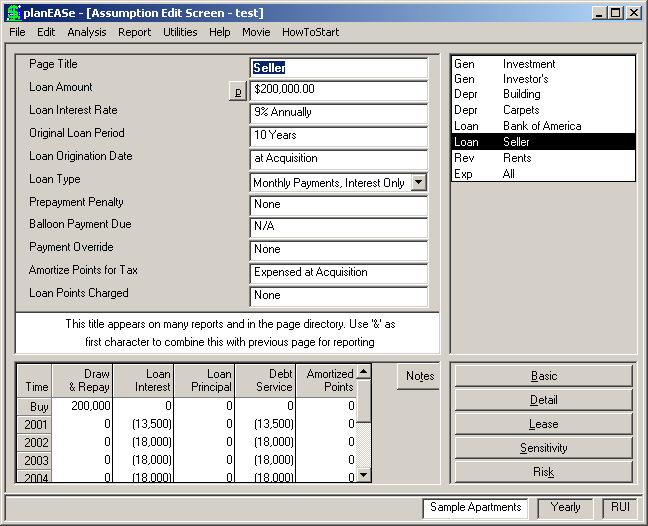
For the Sample Apartments, the Bank of America loan is normal Amortizing over 30 years with a monthly payment computed from the 30 year life and 9.75% interest rate assumptions. The Seller loan is Interest-Only over 10 years with a monthly payment computed from the 9% interest rate assumption.
PREPAYMENT PENALTY A value of exactly one (1.00) for this assumption causes a prepayment penalty to be computed equal to six months interest on an amount computed by subtracting 20% of the original loan amount from the outstanding balance at the time of the prepayment. A value of zero eliminates any prepayment penalty. A negative value between 0 and 100 specifies a percentage of the loan balance due at the time of the
prepayment. ANY other value (including negative values) specifies a prepayment penalty equal to the dollar amount of the assumption value.
BALLOON PAYMENT DUE only affects amortizing loans. This assumption is entered in periods (months if Monthly Payments, quarters if Quarterly Payments, etc.), and handles three situations: ! First, you can project refinancing in, for example, three years by assuming a balloon due in April of 2004 (36 months) and entering another set of loan assumptions for a loan beginning at that time. ! Second, some amortizing loans call for a balloon payment, for example, in five years even though the amortization is based on a longer period of time. In such cases you should set the Original Loan Period to the amortization period (so that the payment amount is computed properly) and use a value of 60 months for this assumption to call the loan after five years. ! Third, an assumed loan is a loan where the Loan Origination Date is before the Acquisition Date. If such a loan has a Balloon Payment Due, the number of periods to be entered here is measured from the Loan Origination Date rather than the Acquisition Date. A zero value here eliminates any consideration of a balloon payment.
PAYMENT OVERRIDE is the periodic payment amount for the loan, entered as $/period where the payment period is as specified in the Loan Type. If this assumption is zero it has no effect. If it is any other amount planEASe assumes the assumption value is the payment for the loan, overrides any computed payment (for Amortizing and Interest-Only loans), and amortizes the loan according to the entered payment amount and interest rate (for ALL Loan Types). This allows you to enter “negatively amortized” loans where the payment does not cover the interest due, and therefore the principal amount grows over time. On such loans, the accruing interest compounds each payment period. If the Loan Origination Date is before the Date of Acquisition, the system uses the payment amount to amortize the loan up to the acquisition date, and starts the loan at the amortized principal amount. If the Payment Override is less than or equal to 25.00 planEASe treats the amount as a percentage (Payment Constant) of the Loan Amount. Thus a value of 1.00 causes a periodic payment of 1% of the Loan Amount. For continuation loans, the Loan Amount used is the original (first page) Loan Amount, but using a negative amount of 25 or less during a continuation loan causes the payment to be a percent of the then current loan balance.
AMORTIZE POINTS FOR TAX handles the tax treatment of any loan points as shown in this table. The tax deduction for the points, whether amortized or not, is added to the “Interest Payments” column of the reports. If the Holding Period ends before all the points have been amortized, the remaining amount is deducted at sale in the “Interest Payments” column. The use of values of 2 or more to amortize over a specified life is meant specifi- cally for loans with changing interest rates and/or changing payment amounts. Such loans are planned in planEASe as separate consecutive Loan Pages (Continuation Pages), one for each change in payment or interest rate. In such a case, the loan points should be entered in the first page for such a loan and amortized over the total life of the loan rather than the life of that Loan Page.
LOAN POINTS CHARGED is the loan fee sometimes charged by the loan originator for handling the loan. Values greater than 100 are assumed to be a dollar amount, while values of 100 or less are treated as a percentage of the Loan Amount. Thus an assumption value of 1.5 means that the borrower is to pay 1.5% of the loan amount to the originator. Points are subtracted from the loan proceeds for cash flow purposes in the analysis, but the balance amortized internally is not affected. Thus a $100,000 note with one point shows $99,000 being received from the lender, but planEASe still believes that you owe him $100,000 and amortizes
See also the following topics: Page
Original Issue Discount Implied Interest ... 209 Note Discounting ...................... 209 Partial Loan Payments ................. 211 Split Down Payments .................. 211 Compensating Balances / Reserves ...... 211 Variable Rate/Payment Loans ........... 212 that amount in computing the loan. For assumption of existing loans, planEASe computes any percentage points based on the loan balance outstanding at the time of the loan assumption.
There are two Loan Pages for the Sample Apartments. The first, shown in the Bank of America Loan Assumptions screen on page 92, is for a $600,000 first mortgage from Bank of America. This is a new loan (Loan Origination Date of 0.00) taken at 9.75% interest for 30 years. The Amortizing Loan Type specifies a monthly payment amortizing the loan over that 30 year period, with the payment amount to be computed by planEASe. There are no points on this loan, but a prepayment penalty applies.
The Audit Window for the Bank of America loan shows the $600,000 loan proceeds as a positive cash flow at the Buy time. planEASe computes a $5,154.93 monthly payment for this loan (which you can verify with any financial calculator), so the annual Debt Service is 12 times that, or $61,859. The amounts in the first and last years represent nine and three months of debt service, due to the April Date of Acquisition and four year Holding Period. End of Year Payments are paid on December 31 rather than January 1, under the assumption that the normal taxpayer pays such payments in this fashion to get the earlier tax deduction. Thus the first and last years show nine and three payments where you might expect eight and four.
The prepayment penalty for the Bank of America loan is $22,603, which is shown in the Sell line as Loan Interest. This amount is six months interest at 9.75% on the outstanding balance at sale of $583,647 less $120,000 which is 20% of the original $600,000 loan amount.
The second Loan Assumption page, shown here, specifies a $200,000 Interest-Only loan with monthly payments from the Seller at 9% for ten years. Since the payment is interest-only, it is entirely deductible, and the Loan Interest is the same as the Debt Service.
Page SubTypes Each Multiple Page Type in planEASe, (Depre- ciation, Loan, Revenue, Fee and Funding) may have one or more Page SubTypes associated with it. Loan Page SubTypes are Loan-drw and Loan-prm, detailed in the Development Spend- ing section on pages 179 and 181, respectively, and Loan-us, detailed on page 190. In addition, planEASe handles Participating Loans, as detailed on the following page.
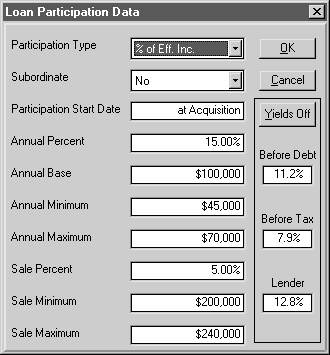
Loan Participation refers to additional loan payments (interest) which may be negotiated with the lender and depend on the performance of the property or invest- ment. On the left side of the Loan Amount field, there is a P button which allows you to enter Loan Participa- tion terms. The button is only shown for Loan Pages where the Page Title does not begin with an “&” character. Pressing the P button brings up the Loan Participation Dialog shown here, allowing you to set the values for annual and/or sale participation:
Annual Participation Participation Type allows the amount of participation to be based on Effective Income, NOI, or Cash Flow Before Debt (NOI less Capital Spending). Additionally, any of these bases may be lowered by the amount of Debt Service for earlier loans and this loan by setting Subordinate to Yes. The Participation Base you set may be further adjusted by specifying an additional amount to be subtracted in the Annual Base field. Setting the Participation Type to None eliminates all participation for this loan, no matter what the settings for the other fields in this Dialog. You may delay the start of participation by setting Participation Start Date to a planEASe Date after the start of the loan.
In all years, the Participation Base (if positive in that year) is multiplied by the amount you enter in the Annual % field to determine the Participation Amount to be added to Debt Service (and Interest Expense) for the loan. If you enter non-zero amounts in the Annual Minimum and/or Annual Maximum fields, the Participation Amount is appropriately adjusted. In case of partial first or last years for the loan participation, the Annual Base, Annual Minimum and Annual Maximum amounts are prorated for the partial year.
Sale Participation If you specify a non-zero Sale %, planEASe adds that percentage of the Sale Price to Debt Service and Interest Expense at the sale. If you enter non-zero amounts in the Sale Minimum and/or Sale Maximum fields, the Sale Participation Amount is appropriately adjusted. The Sale Participation Amount is treated exactly the same as a Loan Prepayment Penalty, and is reported in the same places.
Yields The Yields area on the right side of the Dialog shows the Rate of Return Before Debt, Rate of Return Before Tax (After Debt) and the Lender Yield for the investment, allowing you to instantly see the effect of increasing or decreasing participation as you enter the values. Rates are either IRR's or MIRR's depending on the Model in use. Lender Yield is computed on the combination of all loans, so if you want to see the yield for this particular lender, you should set the loan amounts for all other loans to zero before entering this Dialog. For exceptionally complex Assumption Sets, the time to compute the yields may be eliminated by clicking the Yields Off toggle button. Yields are automatically On when you enter this dialog, and may be reactivated by clicking the Yields On toggle.