Unit Sales Parameter Page
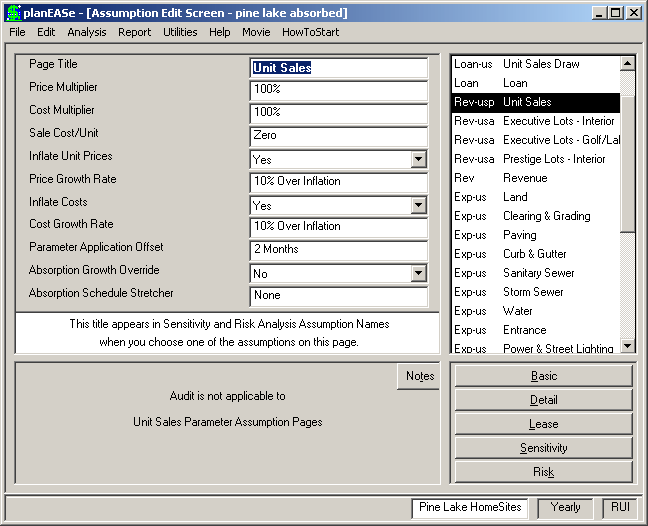
A Unit Sales Parameter Page is a Page SubType generated by entering a Unit Sales Dialog, accessed by choosing Edit/Unit Sales... One Unit Sales Parameter Page is generated in each Assumption Set containing Unit Sales, and the purpose of the page is to provide you with global variables you may use to investigate the effect of changes in your Unit Sales projection. You can edit any of the assumption values shown, and the resulting analysis will corre- spond to the edited values. Additionally, appro- priate assumption values of the Unit Sales Pa- rameter Page may also be varied in Sensitivity and Risk analyses. The assumptions in a Unit Sales Parameter Page (Page Abbreviation Rev-usp.) are:
PRICE MULTIPLIER (normally 100%), this is a factor you may apply to all of the Unit Prices in all Unit Sales Revenue Pages (and NO OTHER Revenue Pages) to increase (or decrease) all of them to a fixed percentage of their specified values. Very useful in Sensitivity and Risk Analyses.
COST MULTIPLIER (normally 100%), this is a factor you may apply to all of the Costs in all Unit Sales Spending Pages (and NO OTHER Expense Pages) to increase (or decrease) all of them to a fixed percentage of their specified values. Very useful in Sensitivity and Risk Analyses.
SALE COST/UNIT (normally 0) is a percentage that is used (if different from 0) as the Unit Sale Cost (in place of the individually specified Unit Sale Cost in each Unit Sales Revenue Page). for all Unit Sales.
INFLATE UNIT PRICES choose Yes to apply Inflation to all Unit Sales Revenue Pages planned with the Unit Sales Revenue Pages (Discrete). Inflation will NOT be applied to Absorption Revenue Pages unless you have chosen Yes for the Absorption Growth Override assumption.
PRICE GROWTH RATE if you choose Yes in Inflate Unit Prices (above), this rate is applied to the Sales in all Discrete Unit Sales Revenue Pages (and NO OTHER Revenue Pages). Inflation occurs each month, so a sale scheduled for January 2002 will have less inflation impact applied to it than one scheduled for February 2002. If you have chosen Yes for the Absorption Growth Override assumption, this growth rate is also applied to prices on Absorption Unit Sales Revenue Pages as well.
INFLATE COSTS choose Yes to apply Inflation to all Unit Sales Spending Pages.
COST GROWTH RATE if you choose Yes in Inflate Costs (above), this rate is applied to the Costs in all Unit Sales Spending Pages. Costs will be inflated up to the month of expenditure. Cost spread over two or more months will be inflated in all months following. Inflation occurs each month, so a cost incurred in January 2002 will have less inflation impact applied to it than one incurred in February 2002.
PARAMETER APPLICATION OFFSET allows you to apply these parameters (except the Absorption Schedule Stretcher described below) only to Costs and Sales occurring on or after this number of months after the Date of Acquisition. Thus, if your Acquisition Date is February 2002 and the Offset here is 2 months, these Parameters will only affect Sales and costs occurring in and after April 2002. In this case, any Inflation begins in April 2002, NOT February 2002.
ABSORPTION GROWTH OVERRIDE allows you to override the Unit Sales Growth Rate assumption on ALL Unit Sales Absorption Pages and use the Price Growth Rate instead.
ABSORPTION SCHEDULE STRETCHER allows you to stretch (or contract) the schedule for all Unit Sales planned by the Absorption Method. You can do this for individual Unit Types by changing the Units Sold per Month on the Unit Sales Revenue Page (Absorption), but this Parameter varies ALL Absorption Sale Schedules at the same time. Entering 10 here means that the Schedules will be 10% longer in time, while minus 20 means they will be 20% shorter than specified. The actual calculation involves changing the Units Sold per Month by the entered percentage for each Unit Type. Thus an entry of 50% Longer would cause a Units Sold per Month of 2.54 to be computed as 2.54/1.5 or 1.69 Units Sold per Month. The maximum stretch allowed is 200%, and the maximum contraction is 50%. This Parameter applies from the beginning of the Absorption Schedule(s) no matter what the Parameter Application Offset value is.
Whether you are using the Absorption Schedule Stretcher or not, if you are performing a Unit Sales Analysis, planEASe will automatically stretch the Holding Period and adjust the Date of Acquisition to assure that all scheduled sales and costs will occur within the Holding Period. If these adjustment(s) occur within the Unit Sales Dialog or during calculations of an Audit, Detail or Basic Analysis, you are notified of the adjustments by a status message and the actual Assumption Values are changed at the Assumption Edit Screen. If the adjustment(s) occur during Sensitivity or Risk Analysis, they occur without notice, and the original values are restored following the Analysis.