Utilities Menu
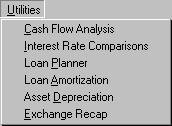
The Utilities Menu is available only if you have purchased the optional planEASe Financial Utilities. It provides the following functions:
Cash Flow Analysis allows you to enter (or import from your planEASe Basic Analysis with the File/Import menu option) a cash flow stream together with the dates of receipt or disbursement, and display/report the discounting process used to compute the IRR, MIRR, NPV and/or the CpA resulting from those cash flows. Cash flows you enter or import may be saved and opened in later sessions.
Interest Rate Comparisons allows you to compare interest rates quoted on different bases.
Loan Planner is useful for analyzing loans with a single payment and interest rate. It displays/prints a table showing amortizing payments for a range of loan amounts and interest rates and/or an amortization schedule for the chosen loan. When you request this function, you may fill in the loan values you want in the data entry boxes in the left side of the screen. As you do so, the loan amounts, interest rates, and payments shown in the table are updated to reflect the values you enter.
Loan Amortization is useful for analyzing loans with variable payments and/or interest rates. It allows you to enter the terms for a loan with variable monthly payments and/or interest rates, and display/print amortization schedules for the loan. After you have entered the loan terms, you may review the results for any or all years on the screen without spending the time to print reports. You also may save loan terms on disk for easy recall and adjustment of the loan terms.
Asset Depreciation allows you to generate/print asset depreciation schedules. When you have entered the information about an asset, you have the choice of saving that information on disk. If you save it, you can recall it at any time in the future, change anything you want, and put the depreciation amounts on the screen for easy transfer to your tax return or tax plan.
Exchange Recap allows you to enter and balance a 1031 Exchange transaction on either a 2 party (Exchanger - Exchanger) or a 3 party (Exchanger - Buyer - Seller) basis. You may print the Recap Form, a Recap Report for each of the parties, and a Basis Adjustment Report for the Exchanger(s). You may save exchanges on disk, and open them for re-processing at a later time. Exchanges involving more parties are processed as multiple instances of 2 and/or 3 party exchanges.