Expense Assumptions
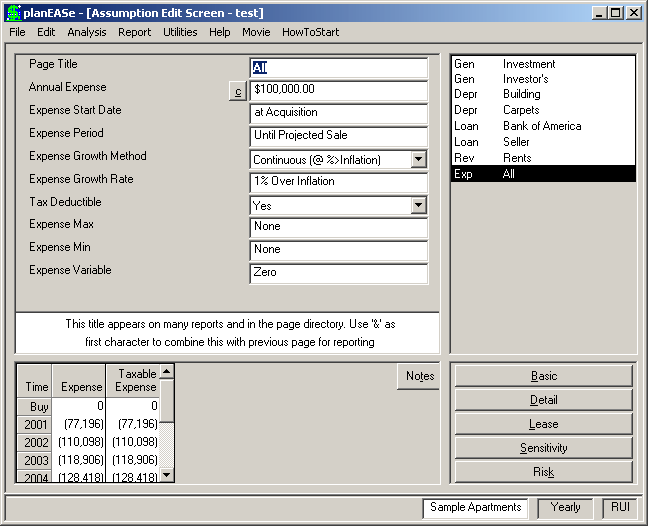
These assumptions are used to calculate the operating expenses displayed in the Taxable Income Projection and Before Tax Cash Flow Projection pages of the analysis. Using Expense Pages, you can plan as many different expenses as you want for a property, and each expense can grow or change in its own manner during the projection period. Variable growth rates are possible. Each expense can start and stop at any time you want, so planning for non-recurring expenses is easy. There are examples of how to accomplish these and other purposes with your Expense Pages in the How Do I Do section of this manual. Expense is a multiple page type, so you may include as many Expense Pages as you desire. For each Expense Page, the individ- ual assumptions are:
ANNUAL EXPENSE is the amount of expense for this item, expressed as an annual (NOT monthly) amount. Amounts of 100 or less are treated as a percentage of the purchase price. Negative amounts may also be used, and subtract from total expenses. An Annual Expense of 0.00 causes the expense to not be computed except for Continuation Pages where a zero Annual Expense Amount causes planEASe to use the ending amount of the previous page for the Annual Expense of the current schedule.
The little c button to the immediate left of the Annual Expense field signifies that a Calculator is available for your use. Pressing the button or the c key opens the calculator, allowing you to enter the SqFt and $/Ft for the amount, which is useful for entering SqFt or Unit related values.
EXPENSE START DATE is the month and year when the expense starts, denoted as described in the Date of Acquisition assumption. If entered as zero, the model starts the expense on the Date of Acquisition. An Expense Start Date of -1.00 may be used for Continuation Pages, which causes planEASe to start the expense at the end of the prior Expense Page
EXPENSE PERIOD is the number of years that the expense continues. A zero value eliminates the expense from the calculations. A fractional value less than one, such as.5 years, causes planEASe to compute that fraction of the Annual Expense and receive it starting on the Expense Start Date. If the Expense Period extends fractionally into a year, planEASe assigns that fraction of the Annual Expense to the year involved. Alternatively, you may enter a negative number here (like -7.04), and planEASe will interpret it as the date when the expense ends (July 1, 2004 in this case). A value of “99" is interpreted as “Until Projected Sale”, insuring that the Expense will last throughout the Holding Period.
EXPENSE GROWTH METHOD You may choose any of the methods of growth shown in the Growth Method Discussion section on page 114.
EXPENSE GROWTH RATE controls expense growth during the Expense Period. Depending on the Expense Growth Method chosen, this value is treated either as an annual percentage growth rate (for Growth
See also the following topics: Page
Reimbursements Dialog ................ 103 Expense Pass-throughs ................ 207 Import NOI ........................... 207 Variable Growth Rates ................. 208 Chart of Accounts ..................... 208 Use 99 for the Revenue/Expense Period... 207 Continuation Pages are wrong........... 207 Methods denoted as (@ Growth Rate)), as an addition to the Inflation Rate (for Growth Methods denoted as (@ %>Inflation)), or as a Dollar Amount (for Growth Methods denoted as (@ $/Year)). In the case of the example, the assumed value of 1% together with the specified Continuous (@ %>Inflation) Growth Method means that the analysis inflates the expense at the Inflation Rate of 7% plus 1%, or 8% annually. Therefore whenever the Inflation Rate assumption is varied the growth rate of the expenses automatically varies correspondingly. A zero value is treated either as zero growth or as growth at the Inflation Rate depending on the Expense Growth Method chosen.
TAX DEDUCTIBLE Choosing No causes planEASe to exclude the expenses for this Expense Page from the Taxable Expense in the Taxable Income Projection . The usual (and default) choice is Yes
EXPENSE MAX caps the expense amount for this Expense Page in exactly the same manner as the Revenue Max assumption described previously.
EXPENSE MIN caps the expense amount for this Expense Page in exactly the same manner as the Revenue Min assumption described previously.
EXPENSE VARIABLE allows you to adjust the Annual Expense amount for vacancy by dividing it into fixed and variable components. Normally zero, a non-zero percentage here is the percentage of the expense that will vary with the average occupancy each year. Vacancy from months vacant (between lease terms and during absorption) is used to determine the average physical occupancy for the year. Vacancy entered through the Vacancy Factor in Revenue Pages for lessees with SqFt or Units specified (through the calculator) is included as well. For instance, for an Expense Page with an Annual Expense amount of $100,000 and a 75% Expense Variable specified (no growth), the Expense would be as shown in the table.
There is only one Expense Page (titled All) entered for the Sample Apartments, shown in the “ All Expense Assumptions” screen on page 100. As shown there, the expenses as of the April 1, 2001 Acquisition Date are $100,000 annually, planned to grow continuously at 1% greater than the Inflation Rate, or 8% annually in this case. As with the Revenue Period, The “at Projected Sale” shown for Expense Period is caused by entering 99 for this assumption, and is simply a conveniently large number to indicate that the expenses from this page should continue to the date of sale (as long as that date is within 99 years of the Expense Start). Normally, of course, you would want to enter several Expense Pages for a property, breaking out the individual expense items and forecasting them separately on individual Expense Pages.
Expense as Percentage of Effective Income Page
Each Multiple Page Type in planEASe, (Depre- ciation, Loan, Revenue, Fee and Funding) may have one or more Page SubTypes associated with it. Expense has one Page Subtype: Expense % of EI (or Exp - %ei).
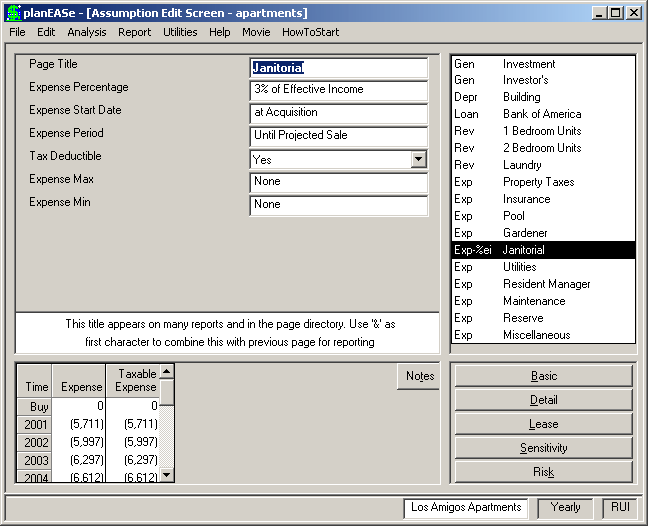
An Expense as Percentage of Effective Income page is an Expense Page SubType which allows you to specify a expense that varies with Effec- tive Income. An example might be Janitorial or Electrical expense. You may have as many Expense as Percentage of Effective Income pages in your Assumption Set as you require. You may also expand the use of these pages by choosing Edit/Add SubPage and Edit/Add Con- tinuation Page when a page of this SubType is displayed. To add an Expense as Percentage of Effective Income page, click on any Expense page in the Assumption Page List, and choose Edit/Add Expense % of Income Page. The assumptions on the page are:
EXPENSE PERCENTAGE is the percentage of Effective Income for this expense. Here we have chosen 3% of Effective Income for Janitorial Expense
EXPENSE START DATE is the Month and year expense starts. Example - (4.01 is April 1, 2001). Use zero for the Acquisition Date, as we have done here.
EXPENSE PERIOD is the number of years the expense is to continue. Enter 99 if it is to continue for the entire holding period, as we have done here.
TAX DEDUCTIBLE Yes means treat this expense as tax deductible. No means do not deduct this expense for taxes
EXPENSE MAX means that the expense associated with this page is limited by this amount. Zero means ignore. An entry other than zero specifies the maximum $ amount. Zero has been entered here.
EXPENSE MIN means that the expense associated with this page is limited by this amount. Zero means ignore. An entry other than zero specifies the minimum $ amount. Zero has been entered here. A value greater than a non-zero Expense Max means that neither assumption value will affect the analysis.