Assumption Set Specifications Dialog
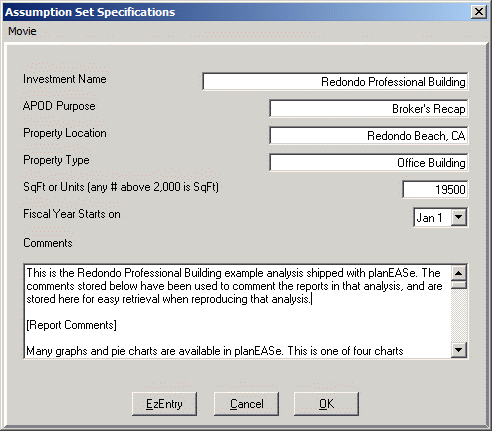
This Assumption Set Specifications Dialog is accessed from the File / New Assumptions Menu Option, to begin entering a new Assumption Set.
Investment Name is constantly displayed in the Status bar at the bottom of the screen, and is used as the default value for either the Title or Subtitle in virtually all planEASe Reports for this Assumption Set. This and the other information in this dialog is easily changed at any time after completing this dialog by clicking on the Investment Name shown in the Status Bar at the bottom of the screen.
APOD Purpose, Property Location and Property Type are displayed in the APOD Report, which is part of the optional Reporting Extension. If you do not have this extension, these fields are not shown here, and the dialog is shorter.
SqFt or Units controls whether planEASe produces Unit oriented APODs, Rent Rolls, Annual Statement and Income Statements, rather than SqFt oriented versions of these reports. It also controls whether the Assumption EzEntry Dialog shows grids for Unit Assumptions or SqFt assumptions. The current crossover preference is 2,000, so the entered value of 19,500 is interpreted as 19,500 SqFt.
Fiscal Year Starts on allows you to specify the first date of the Fiscal Year. Normally January 1, you may change it to the first of any month, and the planEASe reports with time shown horizontally or vertically (Basic, Detail, Lease, and Income Statements) will have the reporting year run from that date through the next 12 months. All Annual, Quarterly and Monthly variations of these reports reflect this specification. When this field is set to other than Jan 1, the Years in the yearly reports are shown as fy2003 rather than 2003 to remind you that the years shown are fiscal rather than calendar, and Quarterly report quarters are shown as Q2f03 rather than Q2 03.
Comments are saved with the Assumption Set for your use in later sessions. The Comments box is a useful place to store Report Commentary so you can later reproduce reports without having to retype the comments. The comments saved here do not print in any reports, so you may store any private notes regarding an Assumption Set here.
Three buttons control your exit from this dialog: Cancel ignores all entries in this dialog and returns you to your previous planEASe Session. OK creates an initial Assumption Set according to your specifications and opens it for your editing with one page of each type (Revenue, Expense, et cetera). All assumption values are set to reasonable default values to begin, and you may then proceed to enter your assumption values in any order you desire. EzEntry is available when you have entered a SqFt or Units value, opening the Assumptions EzEntry Dialog documented on the next page for your use in specifying detailed initial Revenue and Expense items.