Analysis Menu
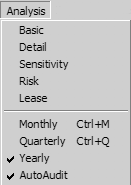
The Analysis Menu provides the five Analysis functions for your assumptions: Basic, Detail, Sensitivity, Risk and Lease Analysis. Choosing one of the first five functions from this menu is the same as pressing the corresponding Analysis Button at the bottom right of the Assumption Edit Screen. This Menu Option offers the following choices:
Basic Analysis allows you to view/print the overall cash flow projection for the investment in any of three Basic Views: Vertical, Horizontal, or Graph.
Detail Analysis allows you to view/print the cash flow projections for any of the multiple page types (i.e.: depreciation, loan, revenue or expense) organized as a grid or array of the individual pages, in any of three Detail Views: Vertical, Horizontal, or Graph. This is useful for showing, for instance, expense breakdowns or revenue breakdowns within the individual property.
Sensitivity Analysis As you perform an analysis, planEASe measures the worth of the investment in terms of rates of return and net present values. Sensitivity Analysis allows you to investigate how these measures vary with a change in one of the assumptions. Any measure may be chosen for the Sensitivity Analysis, and any assumption may be chosen as well. Sensitivity Analysis provides a one page table and graph which describes the relationship between the assumption value and the resulting measure.
Risk Analysis As you perform an analysis, planEASe measures the worth of the investment in terms of rates of return and net present values. Risk Analysis allows you to investigate how these measures vary with a change in one or more of the assumptions. Any measure may be chosen for the Risk Analysis, and any group of assumptions may be chosen as well. Risk Analysis provides a one page table and graph which describes the relationship between the risky assumption values and the variability (or risk) of the resulting measure.
Lease Analysis allows you to view/print a summary of the leases in an Assumption Set as well as individual analyses, reports and graphs for each lease. Lease Analysis is also used to prepare Tenant Representation and Owner Representation presentations.
Monthly / Quarterly / Yearly You may, if you have purchased the planEASe Monthly Extension , change from Yearly to Monthly or Quarterly calculations by checking or unchecking the Analysis/Monthly or Analysis /Quarterly Menu Option (see the Monthly Extension on page 34.)
AutoAudit You may turn the Audit Window on or off by checking or unchecking the Analysis/AutoAudit Menu Option. This may be desirable on slower machines when you are entering original assumption values or when you are in Monthly calculation mode.