Monthly Extension
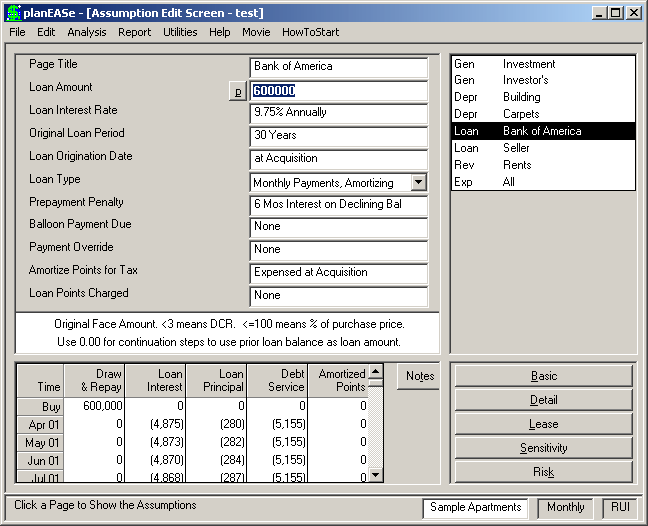
Many users want to analyze development projects, commercial properties with existing leases and new leases, and some imaginative syndications involving staged investments and/or capital additions where annual values are simply not enough to show what is happening to the cash flows. Other users have found that their variable rate loans, refinancing, et cetera, were difficult to understand when presented annually. For these users, we have developed the planEASe Monthly Extension , an optional expansion to planEASe which produces Monthly (and Quarterly) Basic, Detail and Lease Analysis reports (and Monthly/Quarterly Income Statements as well as Monthly/Quarterly Annual Statements if you have the Reporting Extension) from the same assumptions that you use to produce the normal planEASe annual reports. In addition to the considerations below, the Unit Sales Dialog is part of the Monthly Extension and you will not be able to properly analyze Subdivisions, Land Development, Condo Conversions or Marina Slips without it.
No matter whether you have purchased the Monthly Extension or not, Cash Flow, IRR, MIRR, and NPV calculations in planEASe are all based on Monthly Cash Flows, the “Gold Standard” in the industry.
If you have purchased the Monthly Extension , you may change from Yearly processing to Monthly or Quarterly processing (and vice versa) by checking the Monthly or Quarterly options on the Analysis Menu (as has been done in the screen above). In Spoke Functions (like Basic and Detail Analysis), you may access the Period Menu Item to instantly change between Monthly, Quarterly or Yearly analysis, When you do so, the word Yearly in the Status Bar will change to Monthly or Quarterly (or vice versa), and all following computations (including audits) will be made and displayed in the corresponding mode. The screen above shows a Monthly Audit for the Bank of America Loan in the Sample Apartments Analysis. You may also click on the Year Total Item on the Period Menu to change between showing Yearly Totals on the Monthly and Quarterly reports and not showing them.
Monthly, Quarterly and Yearly computations take the same amount of time for the same Assumption Set. In Yearly mode, planEASe responds as it always has and you wouldn’t know that the Monthly Extension existed. In Monthly or Quarterly mode, planEASe still responds as it always has, except that the Audit, Basic, Detail Lease, Annual and Income Statement reports while you are working in Monthly or Quarterly Mode are Monthly or Quarterly Reports rather than Yearly Reports (and correspondingly, all graphs are also shown in the chosen time mode). Cash flows in the Monthly or Quarterly reports exactly match the cash flows in the Yearly reports for the same Assumption Set.
The Monthly Extension also works with the Partnership / LLC Models. We have a particular assumption in the Partnership / LLC Models which works with the Monthly Extension... the Cash Distribution Pattern. This assumption allows you to specify monthly, quarterly, semi-annual or annual distribution of cash from your Partnership / LLC, and further specify the months when distribution will occur. As you would expect, if you hold cash in the Partnership / LLC with this assumption, interest is earned on the balance. While you can use
this assumption without the Monthly Extension , it will confuse your analysis without the Monthly and Quarterly reports that make it's use visible and useful.
Because the monthly reports match the yearly reports, they can be used in a number of ways to augment your use of the system. At the least, monthly reports become useful back-up detail when discussing the yearly reports. More often, the monthly reports will become the reports you use for an analysis because they are so much more understandable for complex analyses, despite their added bulk. The fact that the yearly and monthly report dollar amounts match allows you to mix the time frames in an analysis. For instance, in a development analysis, you might want to show the first 3 years by month, followed by 4 years on an annual basis. Just export both reports, and most word processors and/or spreadsheets will allow you to combine the monthly and yearly reports into one mixed-time-frame report.
The Monthly Extension lends itself to new uses for which the yearly planEASe isn’t suitable. For instance, the monthly reports, when transferred to a spreadsheet, become an ideal budget for a property after acquisition. With the Detail Reports, these budgets can be in whatever depth you want. Just insert lines for actual and variance and a few simple formulas to set up a rudimentary control system. As another example, if you’re creating a loan package to sell your banker, you can analyze the loan yield for the bank by entering the loan amount as negative, yielding monthly cash flows for the loan (before and after tax) together with the IRR and MIRR before and after tax (the lender’s yields in this case). Vary the Holding Period in Sensitivity Analysis, and you can even graph your banker’s yield versus your loan payoff date!
Let us stretch your concept of the system even a little further, if we may be so bold. Nothing says you just have to plan properties with planEASe. Nothing says you have to include depreciation and loans in an analysis. You don’t even have to include a purchase price. Perhaps you’ll find that you can easily plan out revenues and expenses for your business, in consummate detail, transfer that “budget” to a spreadsheet or accounting system program using the Export function, and proceed along your way. Such budgeting can be done on a monthly or quarterly basis with the Monthly Extension .